Workflow Builder
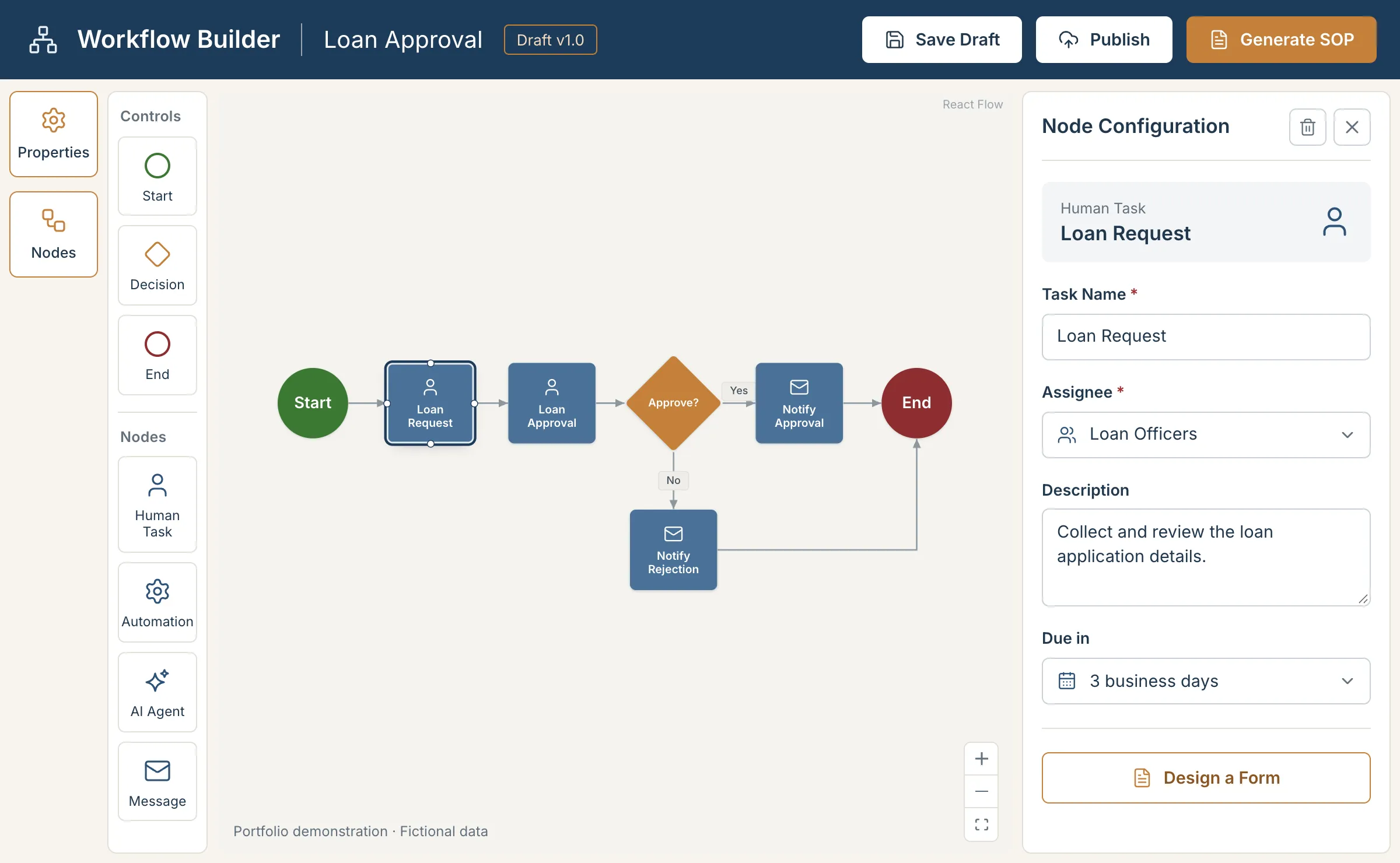
Design and configure workflows with human tasks, automated activities, AI agents, messages, and business decisions.
Loan Approval
Draft v1.0Portfolio demonstration · Fictional data
Product Design & BuildingEngineering & Architecture
I led the product vision, design, and implementation of a workflow platform. The platform coordinates human tasks, automated activities, AI agents, and business decisions.
I defined how users would build and manage workflows, including the interactions and capabilities they needed. I also helped shape the underlying architecture, from workflow execution and data exchange to tracking and auditing running instances.
The platform was developed in close collaboration with the engineering team, from defining the workflow model and frontend/backend contracts through implementation and release.
Building a workflow is one part of the puzzle. The platform also needs to manage running instances, coordinate human and automated tasks, exchange data between them, and track execution from start to finish.
Both are working prototypes I built for this portfolio, with fictional data. Try them here, or expand one for more room.
These demonstrations are made for tablet and desktop screens. On a phone, use Expand to open one in the whole window.
Design and configure workflows with human tasks, automated activities, AI agents, messages, and business decisions.
Portfolio demonstration · Fictional data
Follow a running workflow, identify completed and active steps, and inspect the execution history and audit details.
Portfolio demonstration · Simulated execution data
Behind the builder and the instance view is a model of how workflows are defined, run, and recorded. These are the parts of it that shaped the product most.
From design to publication, execution, and audit, with each running instance tied to the version it started under.
A workflow is designed in the builder as a draft. Publishing it freezes that definition as a numbered version, and from then on new instances run that version.
Information collected or produced in one step is available to the steps that follow.
Each workflow defines its variables: the information it works with, such as a loan amount or an applicant's email address. Steps read and write those variables as the instance runs.
${[var-name]}. A message to ${[requester_email]}, for example, is addressed to whoever submitted the request.People and automated activities run differently, so the platform tracks them differently.
A submitted approval, such as Yes or No, is business data. It doesn't decide whether the task succeeded: the task is complete either way. The value is what a later decision uses to route the workflow.
Automation that runs on desktops or virtual machines takes part in the same workflow execution and tracking as every other step.
Some business work can only be automated on a desktop, particularly in legacy applications or systems without an API. The platform brings that automation into the workflow so it can be started, monitored, and recorded like any other step.
For banking and securities customers, security restrictions can limit the use of persistent connections such as WebSockets. The integration uses a trigger and polling mechanism to support these environments.
I also designed and documented a mechanism for restricting which desktop or virtual machine runtimes could execute particular automations. This was covered in a PRD and technical design but had not been implemented when I left.
I led the product vision, UX, and technical design of the workflow platform. On the product side, this meant defining how people build and manage workflows, and the capabilities and interactions needed to support their work. The technical design covered workflow execution, data exchange, and the tracking and auditing of running instances.
I worked closely with the engineering team. This included defining the workflow engine, its underlying model, the frontend/backend contracts, and collaborating through implementation and release.
The interactive demonstrations on this page are my own reconstructions for this portfolio, using fictional data. They do not use the original product's code or reproduce its design exactly.