In Lesson 4.2, we created a SKILL.md file containing reusable instructions for evaluating research evidence.
Now we’ll make those instructions available to our Research Agent.
From Skill File to Agent Instructions
Our Skill is stored in a Markdown file:
skills/research-evidence/SKILL.md
It defines how the agent should evaluate a source, distinguish facts from interpretations, and identify limitations.
But storing a Skill in a file doesn’t automatically make its instructions available to the agent.
We need a way to load the file when the agent needs it.
Adding a Skill-Loading Tool
We’ll extend our existing MCP server with a new tool:
load_research_skill()
@mcp.tool()
def load_research_skill() -> str:
    """Load the Research Evidence Evaluation procedure."""
    from pathlib import Path

    path = (
        Path(__file__).resolve().parent
        / "skills"
        / "research-evidence"
        / "SKILL.md"
    )
    return path.read_text(encoding="utf-8")
The tool reads the Skill file and returns its instructions.
Unlike fetch_article(), which retrieves webpage content, this tool retrieves a procedure for the agent to follow.
Connecting the Skill to Our Agent
Our Research Agent already connects to the MCP server.
We’ll instruct it to load the Skill before evaluating evidence:
agent = Agent(
    name="Research Evidence Agent",
    instructions=(
        "Before analyzing a source, call load_research_skill "
        "and follow its procedure."
    ),
    mcp_servers=[server],
)
We haven’t embedded the full procedure in the agent’s instructions. Instead, we’ve told the agent where to obtain it.
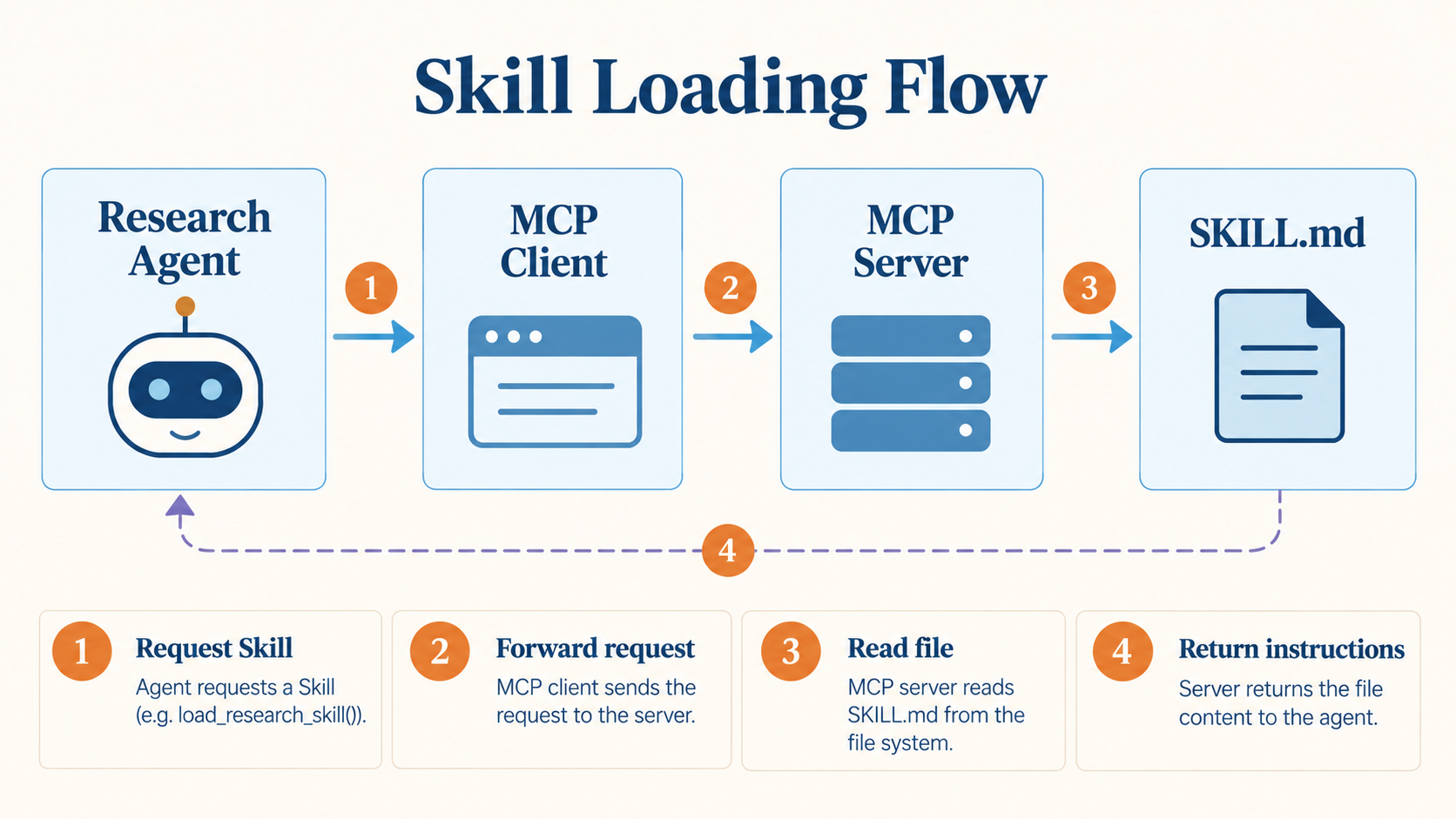
How Skill Loading Works
When asked to evaluate research evidence:
- The agent requests
load_research_skill(). - The MCP server reads
SKILL.md. - The Skill instructions return through the MCP client.
- The agent applies those instructions to its research task.
The agent can then use other research tools to retrieve information and evaluate what the evidence supports.
The Skill guides the analysis. The research tools provide the information being analyzed.
Try It Yourself
Download Lab 04 — Agent Skills. In the extracted lab-04 folder, create and activate a virtual environment, install the requirements, and set OPENAI_API_KEY, as described in the README. Running the lab calls the OpenAI API and may incur charges. Then run:
python lab4_skill_agent.pyThe exercise asks our agent to assess a stored research record related to the Product Builder hypothesis.
In the execution output, each ToolCallItem line shows a tool the agent requested and the arguments it sent, and each ToolCallOutputItem line shows the beginning of a result returned by a tool.
Observe the execution output:
- Did the agent request the Skill?
- Did it retrieve the research record?
- Did its response distinguish evidence from conclusions?
The sample record is illustrative metadata, not independent proof of the hypothesis.
An Important Distinction
Our lab loads SKILL.md through a custom MCP tool.
This demonstrates how reusable instructions can be loaded on demand. It does not mean MCP automatically discovers or manages Skills, or that we’ve implemented a native Skill registry.
In the next lesson, we’ll remove the requirement to always load the Skill and let the agent decide when it is useful.
What Did You Learn?
- A Skill file must be made available to the agent before its instructions can be applied.
- An MCP tool can retrieve Skill instructions from a local file.
- The agent can use those instructions alongside its existing research tools.
- Our implementation demonstrates Skill loading through MCP, not a native Skill management system.
Test Your Understanding
Question 1 of 3
What does load_research_skill() do in our lab?