Behind the Mascot
When we meet a ready-made AI agent, we often meet a character first. We give it a task, and it searches, remembers, works across applications, or returns with completed work. It can feel like a single, self-contained assistant.
The mascot gives the agent a recognizable identity. Behind it is a system of models, tools, memory, permissions, and services that make its actions possible.
In this course, we have built many of the pieces that make agent behavior possible: models, instructions, tools, orchestration, persistent records, approvals, and governance. Now we can look at ready-made agents and recognize the kinds of capabilities that must support the experience.
Meet the Ready-Made Agents

MuseMeta 
DotsOpenAI 
Grok BotxAI
Muse, Dots, and Grok Bot are three examples of a growing category of ready-made agents, not a complete list. We chose them because their character-based presentations make the agent experience particularly approachable.
- Muse (Meta) is presented as a personal agent that can work across connected applications using its own cloud computer and browser. Meta describes memory, permissions, approvals, and a separate safety component for outbound activity. Official introduction.
- Dots (OpenAI) are persistent agents with cloud computers, connected apps, memory, and the ability to pursue work between conversations. OpenAI also describes user controls and approval boundaries. Official introduction.
- Grok Bot (xAI) is presented as a set of always-on AI teammates with cloud computers, connected tools, ongoing context, and opportunities for human approval. Official introduction.
These descriptions reflect provider-published capabilities, not independent evaluations. Products and available features may change.
The Experience and What Supports It
| What we see | What it depends on |
|---|---|
| “It remembers.” | Memory and persistent context |
| “It works across apps.” | Tools, integrations, credentials, and access permissions |
| “It continues while I’m away.” | Hosted execution, saved state, and task management |
| “It asks before acting.” | Approval steps and enforced action boundaries |
| “It completes a complex task.” | Orchestration, tool execution, and checks on results |
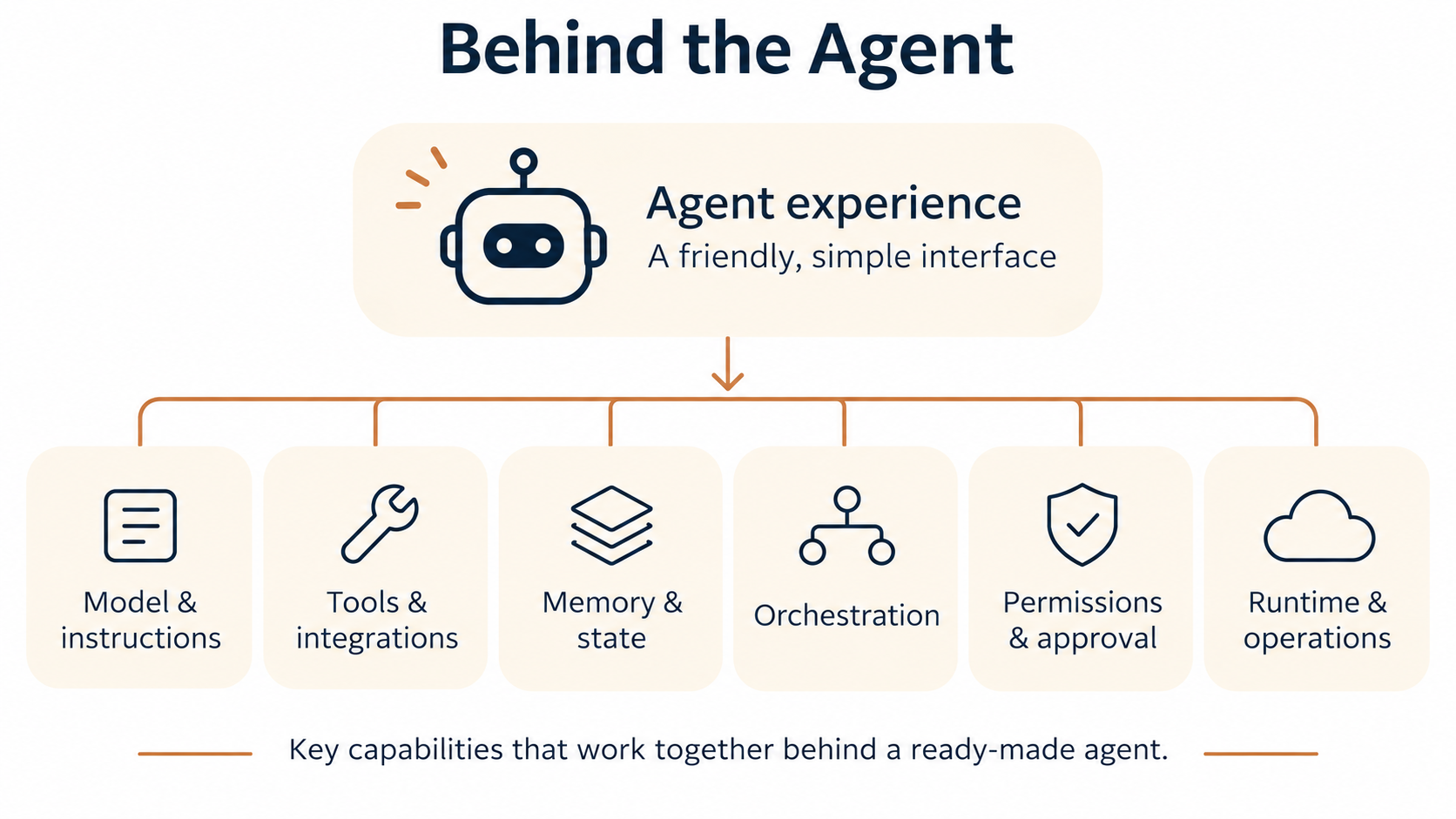
A provider can bundle these capabilities into one product, making them less visible to the user. That simplifies getting started, but it does not eliminate the underlying system.
Our Research Agent and a Ready-Made Agent
Our PM Role Trends Research Agent and these products share many underlying ideas. The major difference is how much of the application we build and control.
| Our research agent | Ready-made agent | |
|---|---|---|
| Getting started | Build and configure the application | Configure an existing product |
| Tools and workflows | Defined in our code | Provided or connected through the product |
| Runtime | We arrange and operate it | Primarily provider-operated |
| Governance | We implement and test specific rules | We use the controls the product exposes |
| Customization | Application-level changes | Within the product’s supported options |
Ready-made agents may offer far more capabilities than our local lab. Our application, meanwhile, gives us direct control over its evidence checks, tool boundaries, and publication approval rules. Neither approach is automatically more suitable for every task.
A key distinction from Module 9 still applies: telling an agent to follow a rule is not necessarily the same as enforcing that rule outside the model. When evaluating a product, we need to understand which controls are configurable instructions and which are enforced by the system.
When an Agent Works for a Business
Imagine using a ready-made agent to collect articles for your own research. You review its findings and decide what to use.
Now imagine a bank using an agent to prepare a financial report. Other people may depend on the results, so the bank needs to know who can access the information, whether calculations are correct, and how the report is reviewed.
A ready-made agent might support either task. The difference is not simply personal versus enterprise use. It is the responsibility attached to the work.
Before adopting an agent for a business service, the organization must verify that its controls meet the requirements of that service.
Lab 10.4: Look Behind a Ready-Made Agent
Choose Muse, Dots, or Grok Bot and review its official documentation. No subscription or paid calls are required.
Find what the documentation says about application access, memory, approvals, and ongoing execution. For each area, classify the information as:
- Documented: The provider clearly describes the capability.
- Not documented: You cannot find enough information about it.
- Needs verification: The capability is described, but its suitability for your intended use still needs testing or confirmation.
Then answer two questions: Would you use this agent for your own research? What would you need to verify before using it for an organization’s report?
A missing detail is not proof that a feature does not exist. It means we should not assume it exists or meets our requirements.
What We Learned
A ready-made agent presents a unified experience, but that experience depends on many of the same components we explored throughout the course. Providers can supply tools, memory, runtime services, and controls, while users and organizations still need to understand what those capabilities allow and where their limits lie.
In Lesson 10.5, we’ll bring these choices together: build an agent application, assemble one with a platform, or adopt a ready-made solution.
Test Your Understanding
Question 1 of 3
A ready-made agent continues working after you close its chat. What best explains how this is possible?