In Lesson 6.4, we adopted hybrid orchestration: a Coordinator Agent selected specialist tools while Python recorded shared state and enforced validation. That protected the application from producing a conclusion when required evidence was missing. But a valid research proposal is not automatically authorized to become a stored research record.
This lesson adds a human approval boundary and controlled persistence through a local MCP server. The research material remains fictional so we can examine the workflow without confusing the exercise with independently verified evidence.
From a validated proposal to an authorized action
The distinction is between can proceed to review and is authorized to persist. Python first checks the structured Discovery and Evidence results. A passing validation means the proposal satisfies the lab’s rules for review; it does not establish that the claim is true. Python then presents the exact proposed record to a human reviewer. Only an explicit approval allows the application to attempt persistence.
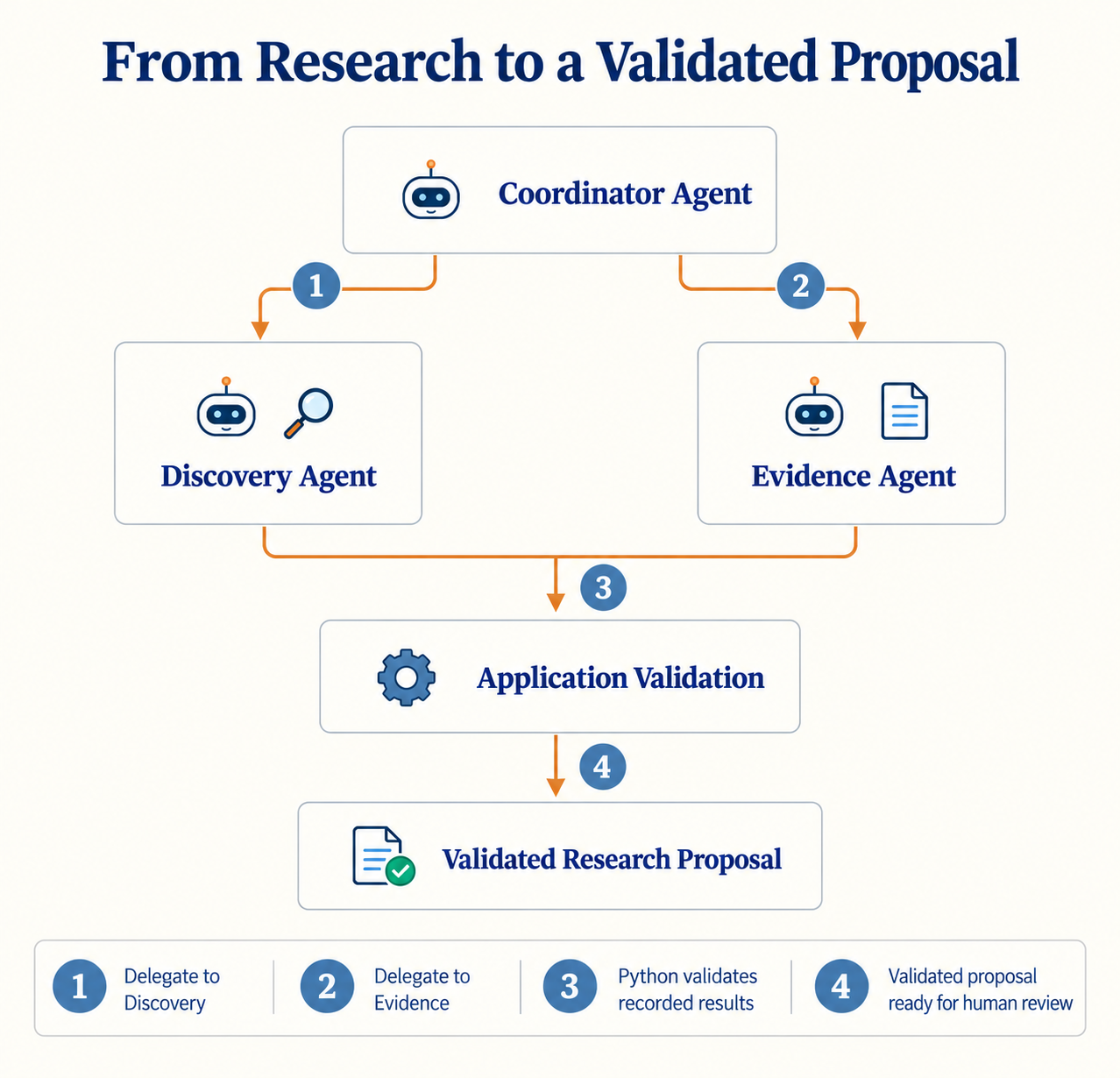
The Coordinator continues to decide which specialist tools to invoke. It can prepare evidence for review, but cannot approve its own proposal or call the MCP persistence tool. Once its run ends, approval and persistence remain under application control. Rejection terminates the current execution; it does not return control to the Coordinator.
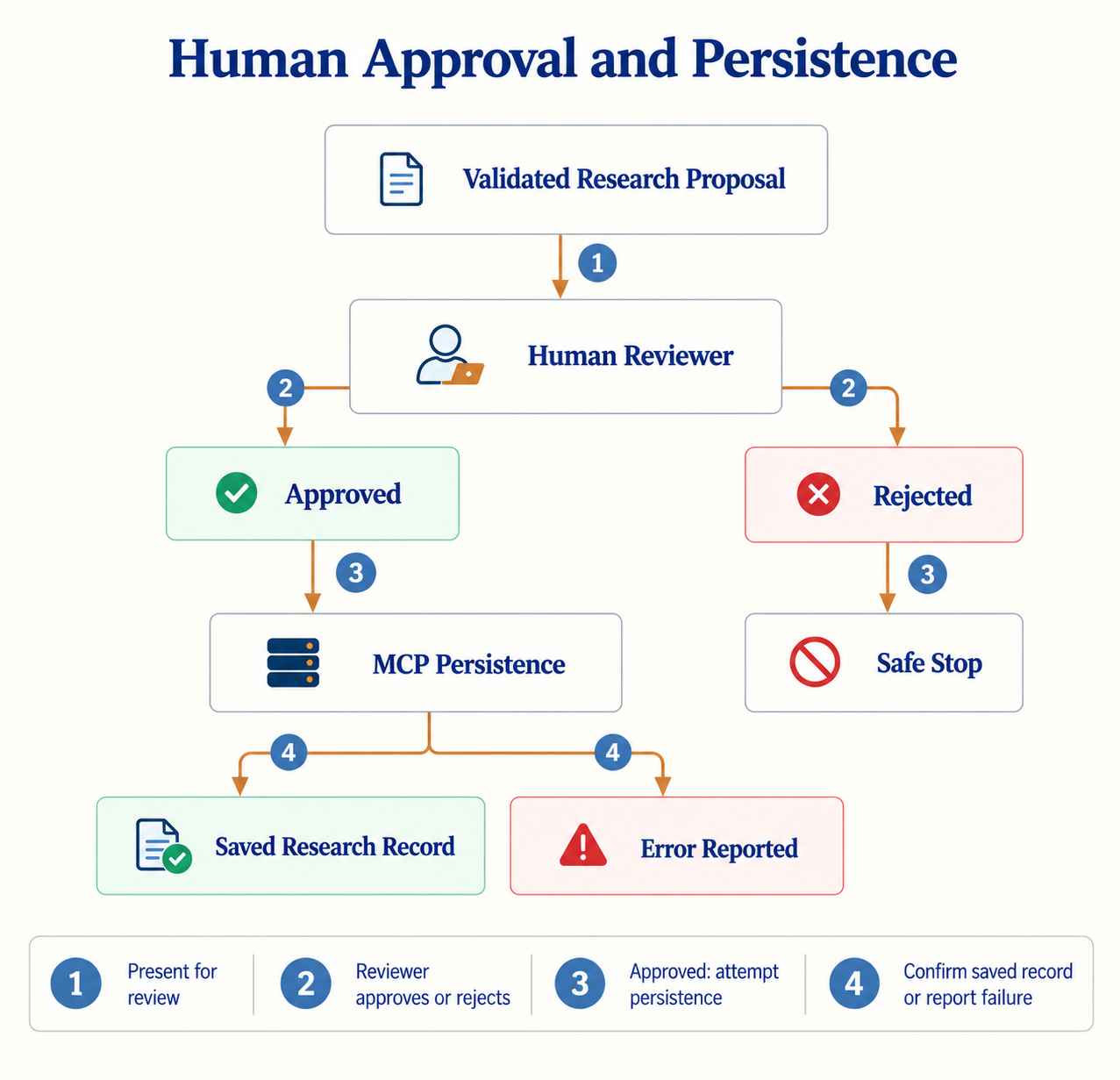
The approval applies to a specific structured proposal. The lab computes a SHA-256 fingerprint of that record and reports the fingerprint alongside the human decision. This ties the decision to the exact proposed content; it is not an identity check or a substitute for enterprise authorization.
Persistence is an application-controlled MCP operation
Experiment 02 extends the approved branch. Python opens a local MCP stdio session and invokes the persistence tool. The server attempts the write and returns a result through MCP to Python. The application reports success only if the tool reports success. A connection or write failure must be reported as a failure, not as a saved record.
The MCP server is local for this exercise. The CLI approval prompt is educational, not authenticated approval, and the local record file is not a production audit store.
Hands-on Lab: Governed Multi-Agent Workflow
Use the shared Module 6 lab. It includes two separately runnable Python experiments for this lesson:
lab6_5_01_approval_gate.pylab6_5_02_governed_persistence.py
Run Experiment 01 first, then Experiment 02. Both run independently. They use lab6_5_sources.py, the included lab6_5_mcp_server.py, and fictional records in sources/module-06/.
Use Python 3.12 or newer. Follow README.md in the shared lab for installation and API-key configuration. Run each experiment from the extracted lab-06 folder.
Experiment 01: Human approval without persistence
python lab6_5_01_approval_gate.pyThe application loads its packaged sources, the Coordinator requests Discovery and Evidence assessments, and Python validates the structured results. On a passing result, Python presents a proposed record, its SHA-256 fingerprint, and an explicit approval prompt. Enter REJECT on one run and APPROVE on another. The prompt is case-insensitive for the word APPROVE; any other response rejects. Either decision ends Experiment 01 without persistence.
Observe the numbered trace. It shows the Coordinator’s tool-wrapper calls, Python state updates, validation, and the human decision. It does not reveal hidden model reasoning or represent a complete SDK trace.
Experiment 02: Approved persistence through MCP
python lab6_5_02_governed_persistence.pyFirst enter REJECT and check that no MCP persistence call occurs. Run it again and enter APPROVE. Python should open the local MCP session, invoke persist_approved_research, and report the server’s result. The local MCP server starts as part of the script; there is no separate cloud MCP service to configure.
In the observed successful run, application validation passed, the human approved, and the trace recorded:
Application opened local MCP stdio session
Application called MCP persist_approved_research
MCP response: persisted
The final governance result reported validation: pass, human_approval: approved, and persistence.status: persisted. The proposal had the same SHA-256 fingerprint in both observed experiments, even though the Coordinator’s natural-language responses differed.
An approval authorizes an attempt to persist. If the MCP connection or write fails, the application must report an error rather than claim a record was saved. The successful trace above is a recorded lab observation, not a guarantee of every future run.
What Did You Learn?
Hybrid orchestration lets the Coordinator choose research actions while Python enforces the rules for consequential operations. Structured output makes data easier to validate, but does not prove a research claim. Validation determines eligibility for review; a human authorizes the specific proposed record; MCP performs the write only after approval. Each boundary has a different responsibility.
Across Module 6, we examined code-driven, model-driven, and hybrid orchestration. The appropriate approach depends on project requirements and the kinds of control the application needs, not on a universal ranking of autonomy.
Test Your Understanding
Question 1 of 3
Why does the application still require human approval after validation passes?