In Lesson 3.3, we built an MCP server that exposes two research tools.
Now we’ll connect our Research Agent to that server and observe how it discovers and uses those tools.
Connecting the Agent
The OpenAI Agents SDK provides MCPServerStdio to connect an agent application to a local MCP server.
from agents.mcp import MCPServerStdio

async with MCPServerStdio(
    name="Product Research MCP",
    params={
        "command": sys.executable,
        "args": [str(server_path)],
    },
) as server:
    tools = await server.list_tools()
The SDK starts the server as a separate process and communicates with it through stdio.
The async with block opens the connection, keeps it available to the code inside the block, and closes it when the block ends. Because this code is asynchronous, the lab uses await Runner.run(...) instead of Runner.run_sync(...); both execute the same agent workflow, and the script starts the asynchronous program with asyncio.run(main()).
list_tools() retrieves the tools registered by the server.
Discovering Available Tools
When you run the lab, the first section of the output, MCP TOOLS DISCOVERED, lists each tool the server exposes:
get_research_source
fetch_article
The MCP client retrieves each tool’s name, description, and input schema.
The SDK makes these definitions available to the AI model so it can determine which tool to request.
The agent doesn’t need to know how the tools are implemented. It needs to understand what they do and how to call them.
MCP Tool Discovery and Execution
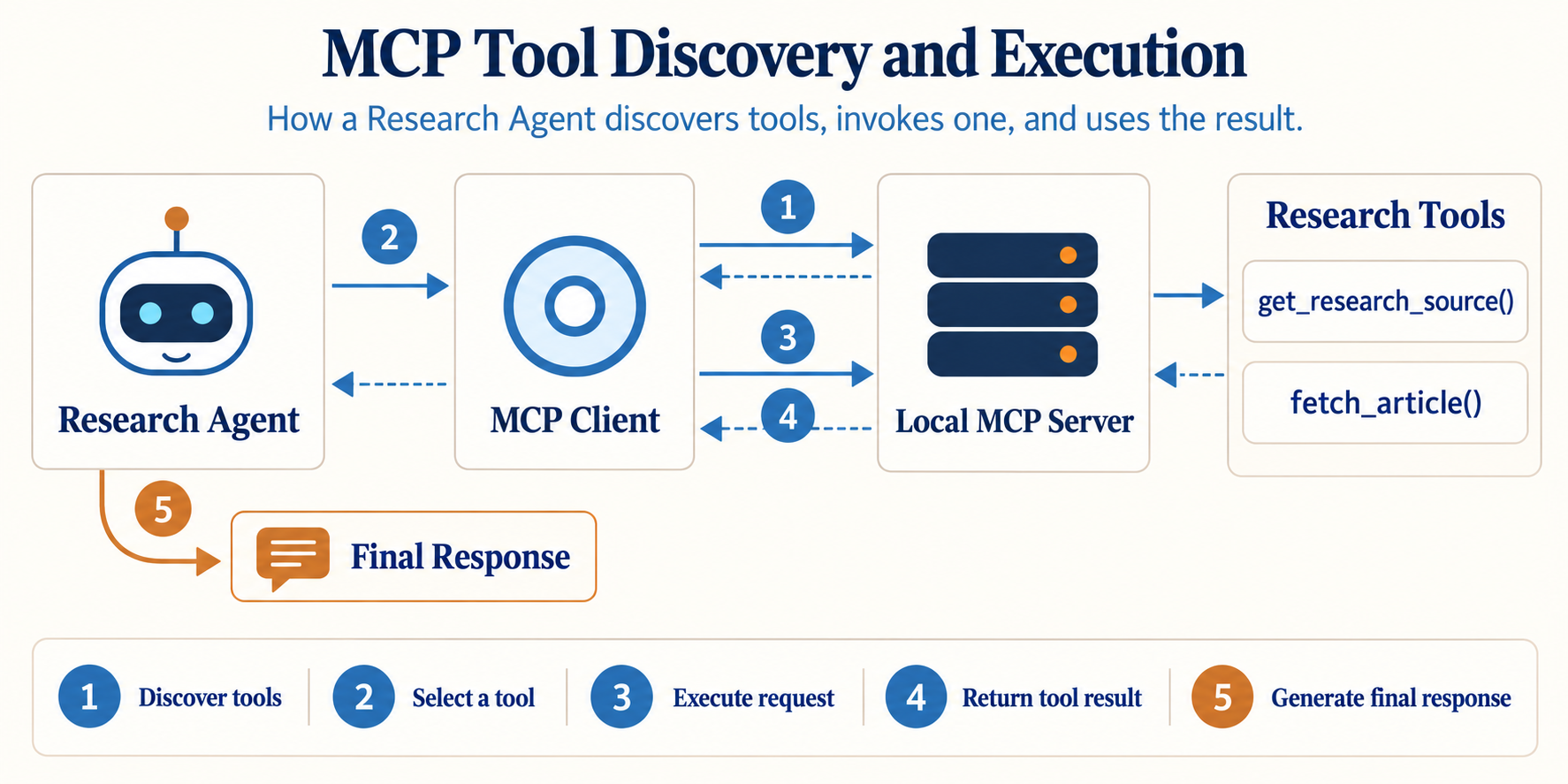
The execution follows five steps:
- Discover tools: The MCP client retrieves available tool definitions from the server.
- Select a tool: The AI model chooses a tool based on the research task and available definitions.
- Execute the request: The SDK routes the request through the MCP client to the server, which invokes the tool.
- Return the result: The tool returns its output to the server. The result travels back through the MCP client and SDK to the model.
- Generate the response: The model uses the returned information to answer the research question.
The same Research Agent initiates the request and produces the final response.
Running Our Research Agent
Our agent connects to the MCP server using the Agents SDK:
agent = Agent(
    name="Product Strategy Research Agent",
    instructions=(
        "Use MCP research tools to distinguish source metadata from full text. "
        "Do not claim to have read material that a tool did not retrieve. "
        "State limitations; do not invent measured results."
    ),
    mcp_servers=[server],
)
result = await Runner.run(
    agent,
    "Retrieve metadata for source builder_pm_001, then explain what we can "
    "and cannot conclude from it."
)Extract the ZIP and open the lab-03 folder. The README covers setup, your API key, and costs.
The lab’s agent script requests the illustrative metadata record builder_pm_001; it does not call fetch_article.
Run It Yourself
In the lab-03 folder, with your virtual environment active and OPENAI_API_KEY set as described in the README, run:
python lab3_mcp_agent.pyThe output has three sections:
MCP TOOLS DISCOVERED: both tools, each with its description and input schema. This is discovery: the client asks the server what it offers, and no model is involved yet.AGENT RESPONSE: the agent’s answer aboutbuilder_pm_001. Your wording will differ from run to run.EXECUTION ITEMS: what happened during the run, in order. They’re printed after the answer, but they record events that happened before the final response.
The agent’s task asks only for metadata, so you should see get_research_source requested and fetch_article discovered but not used.
Examining the Execution
The SDK exposes execution items that help us observe what happened during a run.
Your execution items should look similar to this:
ToolCallItem: get_research_source {"source_id":"builder_pm_001"}
ToolCallOutputItem: {"title": "Illustrative Product Builder source record", "source_type":...
MessageOutputItemToolCallItemis the tool request: the tool the model chose and the arguments it supplied.- Between these two lines, the MCP server executed the tool. That step isn’t printed.
ToolCallOutputItemis the returned result. The preview is shortened for readability. The model receives the complete tool result, includingfull_article_retrieved: false.MessageOutputItemis the answer the model generated from that result.
These execution items help us distinguish the operation the agent requested from the answer it generated.
What Happens When Retrieval Fails?
A tool call can succeed and still return less than the agent needs. For example, a record may contain only metadata, a source may not be found, or a page may not be retrievable. A reliable agent reports what it couldn’t retrieve and explains what can’t be established, instead of analyzing content it never received.
You can see this in the lab. The builder_pm_001 record contains metadata but not the full article, so the agent’s answer shouldn’t describe the article’s contents.
This is an important research principle: a source title or metadata record is not equivalent to having read the source itself.
A reliable Research Agent must account for missing information and unsuccessful operations.
What Did You Learn?
- MCP allows an agent to discover available tools through a standard protocol.
- The AI model selects tools; the MCP server executes their operations.
- Tool results return through the MCP client and SDK to the same agent.
- Execution records help us inspect tool use separately from the final response.
- A tool call does not guarantee successful retrieval or a correct conclusion.
With Module 3 complete, our Research Agent can retrieve information through a local MCP server.
Test Your Understanding
Question 1 of 3
What information does the MCP client retrieve when discovering tools?