In Lesson 5.1, we learned how to turn a research response into a structured record.
But our records still exist only while the program is running. To reuse them in future research, we need persistent storage.
In this lesson, we’ll extend our MCP server to save and retrieve research records.
From Research Record to Knowledge Store
Our Research Agent already uses MCP tools to retrieve information. Now we’ll use the same approach to store approved findings.
For this lab, we’ll use a local JSON file:
research/data/research_records.json
The file acts as a simple knowledge store. Records saved there remain available after the program ends.
This is intentionally lightweight. Our goal is to understand how persistence works through MCP, not to build a production database.
Two New MCP Tools
Our server exposes two operations:
| Tool | Purpose |
|---|---|
get_saved_records() |
Retrieve previously saved research records |
save_research_record() |
Validate and save an approved research record |
Both tools are implemented by our MCP server. The agent doesn’t need to know how the JSON file is managed.
Retrieving Saved Records
The server uses a Python function to retrieve stored information:
@mcp.tool()
def get_saved_records() -> str:
    """Return all persisted research records as JSON."""
    return json.dumps({
        "records": list_records()
    })
The @mcp.tool() decorator exposes the function through MCP.
The underlying list_records() function reads the local JSON store. The tool then returns the records to the MCP client.
Saving a Research Record
Saving requires more care than reading.
Our server provides save_research_record(), which accepts a proposed record and an approval token.
@mcp.tool()
def save_research_record(
    record_json: str,
    approval_token: str
) -> str:
    """Persist a human-approved research record."""
    ...
The complete implementation checks the approval token before validating and saving the record.
The storage function also adds a unique record ID and approval timestamp, and prevents saving an identical finding twice for the same source URL.
The model’s decision to propose a finding is not the same as authorization to save it.
What Approval Means in This Lab
The approval step is handled by the Python application, not by the AI model.
In our exercise, the host application sends an approval token to the MCP server only when the learner confirms the save.
This illustrates an important architectural boundary: an agent should not be able to authorize its own findings simply by declaring them approved.
The token mechanism is an educational example, not a production authorization system. A real application would need stronger identity, permissions, audit controls, and protection against unauthorized writes.
Research Persistence Through MCP
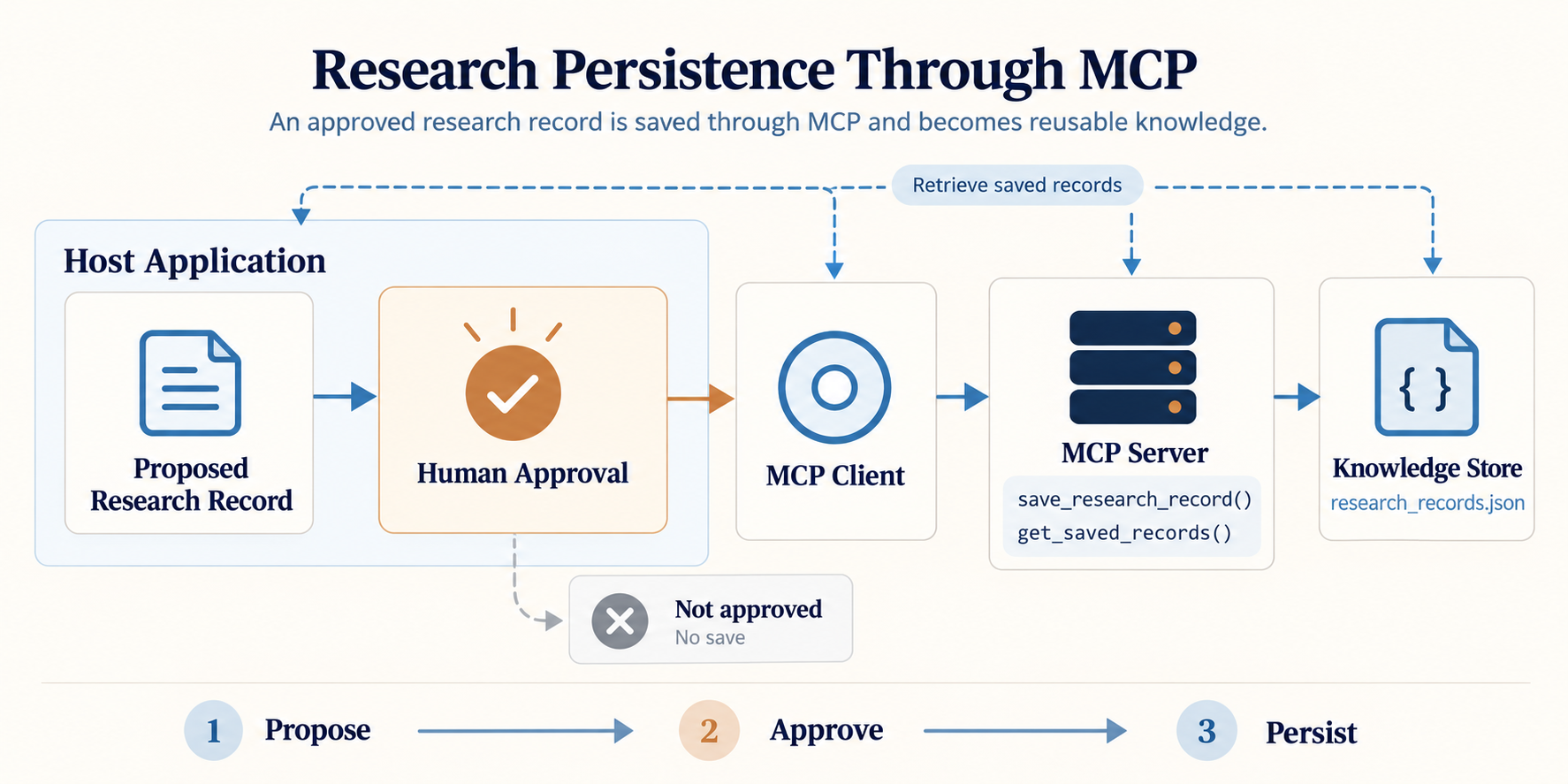
Our workflow separates three responsibilities:
- Propose: Prepare a structured research record.
- Approve: A human decides whether the record should be saved.
- Persist: The application calls the MCP tool, and the server writes the record to storage.
Saved records can later be retrieved through get_saved_records().
This separation provides a foundation for more controlled research workflows.
Try It Yourself
Use the shared Module 5 lab. From the module-05-lab folder, with its virtual environment active, run:
python lab5_2_mcp_persistence.pyThe exercise starts the local MCP server, discovers its tools, and displays the records already saved.
It then presents a synthetic research record for approval.
When prompted, type APPROVE to save it, or enter anything else to leave the knowledge store unchanged.
After approval, the program calls save_research_record() through MCP and retrieves the updated records.
Try both paths. To repeat a successful save, reset the exercise data or change the proposed record; the storage layer rejects duplicate URL-and-finding combinations.
Why Are We Using a Direct MCP Client?
In this exercise, we’re connecting directly to the MCP server without involving our AI agent.
This lets us focus on how research records are saved, retrieved, and protected by a human approval step.
In Lesson 5.3, we’ll bring the Research Agent back into the workflow. It will discover sources, evaluate evidence, and propose findings for approval before they are saved.
What Did You Learn?
- Persistent storage makes research records available across separate program runs.
- MCP tools can expose read and write operations without exposing storage implementation details to the agent.
- Validation, duplicate checks, and approval serve different purposes.
- Saving a research finding should be controlled separately from generating it.
In this exercise, we used a prepared synthetic record to learn persistence.
Test Your Understanding
Question 1 of 3
What makes a saved research record available after the application stops running?