Our Agent Can Now Search the Web
So far, our Product Strategy Research Agent has analyzed a hypothesis and learned to use a custom function tool to retrieve a known research record. That approach works when our application already knows where the information lives.
But what happens when we do not yet know which evidence is relevant?
Our next research question requires the agent to discover information beyond the records we have prepared. We will give it access to live web search, so it can find external sources and bring their findings into its analysis.
A tool expands what the agent can do. It does not guarantee that its conclusions will be correct.
1. From known records to external research
In Lab 2.1, get_research_source(source_id) looked up information from a small, developer-controlled dataset. The input was a known record identifier; the output was predefined. That record was fictional, designed to make tool calling observable.
Web search works differently. We may not know the relevant pages or publications in advance. The agent must identify a useful search direction, request the search capability, interpret the returned material, and decide whether more research is needed.
This is our first opportunity to gather external evidence for the Product Builder hypothesis introduced in Module 1.
2. Custom function tools and hosted tools
The difference is not whether the agent uses a tool. In both cases, the model decides whether to request an available capability.
| Custom function tool | Hosted web-search tool |
|---|---|
| Developer writes and registers the operation | The platform provides the search capability |
| Local code defines how the input is handled | Hosted infrastructure performs the search |
| Reads a specific prepared record in our exercise | Discovers potentially relevant external sources |
Example: get_research_source(...) |
Example: WebSearchTool() |
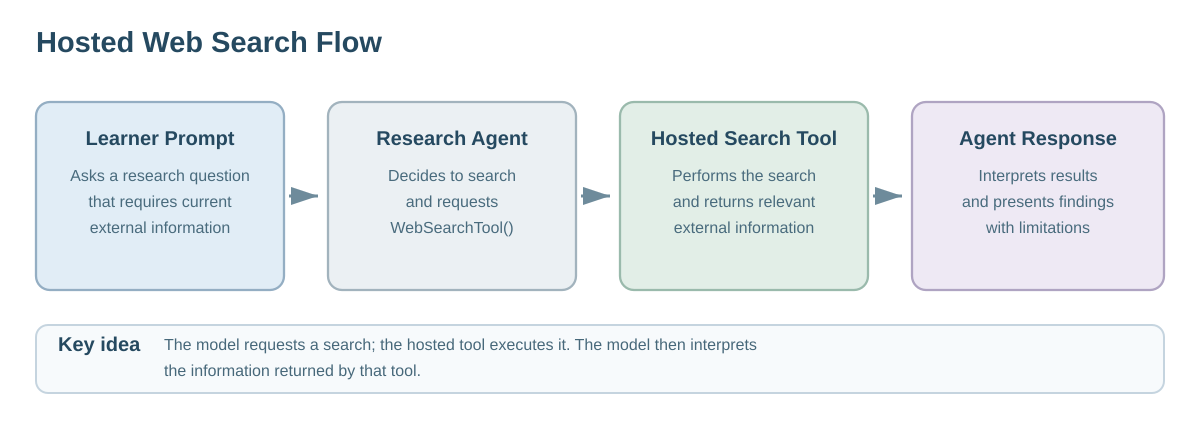
With a hosted tool, we register the provided capability rather than implementing a search engine or web scraper ourselves. The model still does not independently browse websites without that capability being available.
3. Add WebSearchTool to the agent
Here is the central code from Lab 2.2:
from agents import Agent, Runner, WebSearchTool

agent = Agent(
    name="Product Strategy Web Research Agent",
    instructions=(
        "Research using web search. Cite identifiable sources, distinguish measured "
        "results from interpretation, summarize study limitations, and distinguish "
        "developer coding task time from end-to-end product delivery time. "
        "Do not invent data or present preliminary findings as conclusive."
    ),
    tools=[WebSearchTool()],
)

result = Runner.run_sync(
    agent,
    "Find METR's July 2025 experiment on experienced developers using AI "
    "coding tools and its February 2026 follow-up. Report sample sizes, "
    "measured outcomes, methodological limitations, and what these studies "
    "cannot establish about multidisciplinary Product Builders.",
)
print(result.final_output)
Notice what we did not write: a web crawler, search-ranking algorithm, or function for manually downloading pages.
We configured the agent with a hosted search tool, then invoked the Runner with a research task. The runtime and hosted tooling coordinate the tool execution when the model requests it.
WebSearchTool() makes web search available, not mandatory on every run. An agent may sometimes answer without calling a tool. For this lab, our instructions and research question explicitly call for current identifiable sources.
4. Our research question: what does the evidence really measure?
Our hypothesis is that experienced multidisciplinary Product Builders may use AI coding tools to shorten the journey from a product idea to something users can test.
That is larger than a claim about how quickly developers write code.
We will investigate two publications from METR:
- The July 2025 randomized experiment involving experienced open-source developers and AI coding tools.
- The February 2026 update explaining difficulties in interpreting a follow-up developer-productivity experiment.
The research task goes beyond finding a percentage. We need to understand who participated, what was measured, how the study was conducted, and which conclusions the evidence supports.
5. Lab 2.2: Give Your Agent Web Search
The downloadable lab is a self-contained Python exercise. It does not require installing or running Lab 2.1.
Extract the ZIP and open the lab-02 folder. This lesson uses lab2_web_research.py; the package
also contains the Lab 2.1 script from Lesson 2.3.
The package contains the web-search script, setup instructions, SDK dependency, and a research report produced by an earlier run. The report is provided for comparison, not as a guarantee of what a new run will return.
Before running the lab, set up the lab-02 virtual environment and OPENAI_API_KEY as described in the README. If you set up the environment in Lesson 2.3, activate it again in your terminal. Running it calls paid services and may incur API and web-search charges. Results may differ across runs.
From the lab-02 folder, with the virtual environment active, run:
python lab2_web_research.pyAs you run the exercise, watch for the distinction between the agent’s final answer and the execution record. They are not the same thing.
6. Observe, then question
After the agent responds, ask:
- Which findings come from an identifiable publication?
- What exactly did each study measure?
- What caveats affect its interpretation?
- Does that evidence measure the entire product-development process or only one part?
- What additional evidence would test our Product Builder hypothesis?
Do not treat every returned citation as a guarantee that the model interpreted its source correctly. A source can be genuine while a claim about it is incomplete, out of context, or unsupported.
What did you learn?
You have now seen two ways to give an agent capabilities beyond its base model: a custom function for developer-controlled data and a hosted tool for discovering external information.
The next question is how to examine the operations and evidence behind the agent’s answer.
Test Your Understanding
Question 1 of 3
What did we write to give the Research Agent web search in Lab 2.2?