
Finding Research Leads
Our investigation begins with a practical question: where can we find recent job postings and articles that tell us what companies expect from product managers?
We first used live web search in Module 2. Here we use it as the first stage of the PM Role Trends Research Agent, with an important distinction: a search result is a lead, not verified evidence.
A result might contain an outdated listing, a misleading title, or only a short snippet rather than the complete posting. Lab 8.1 collects candidates and records what is known about them. Examining their source content comes later.
Search from Several Perspectives
Searching only for Product Builder would miss conventional Product Manager roles that ask for prototyping, AI-assisted coding, or direct implementation. Searching only for hands-on roles might overlook positions centered on strategy.
Live discovery therefore explores four categories:
- Builder titles: Positions explicitly using Product Builder or similar titles.
- Hands-on responsibilities: PM roles mentioning prototyping, coding, or implementation.
- Strategic PM roles: Positions emphasizing strategy, planning, and leadership.
- Industry articles: Reports and commentary about AI and product management.
The purpose is to collect a balanced starting set, not prove a particular trend.
Two Discovery Modes
| Offline | Live |
|---|---|
| Loads a prepared source snapshot | Uses a Discovery Agent with hosted web search |
| No model API call or web search | A bounded agent run can make multiple model requests and searches |
| Repeatable results | Results may change between runs |
| Works without an API key | Requires dependencies, an API key, and explicit consent |
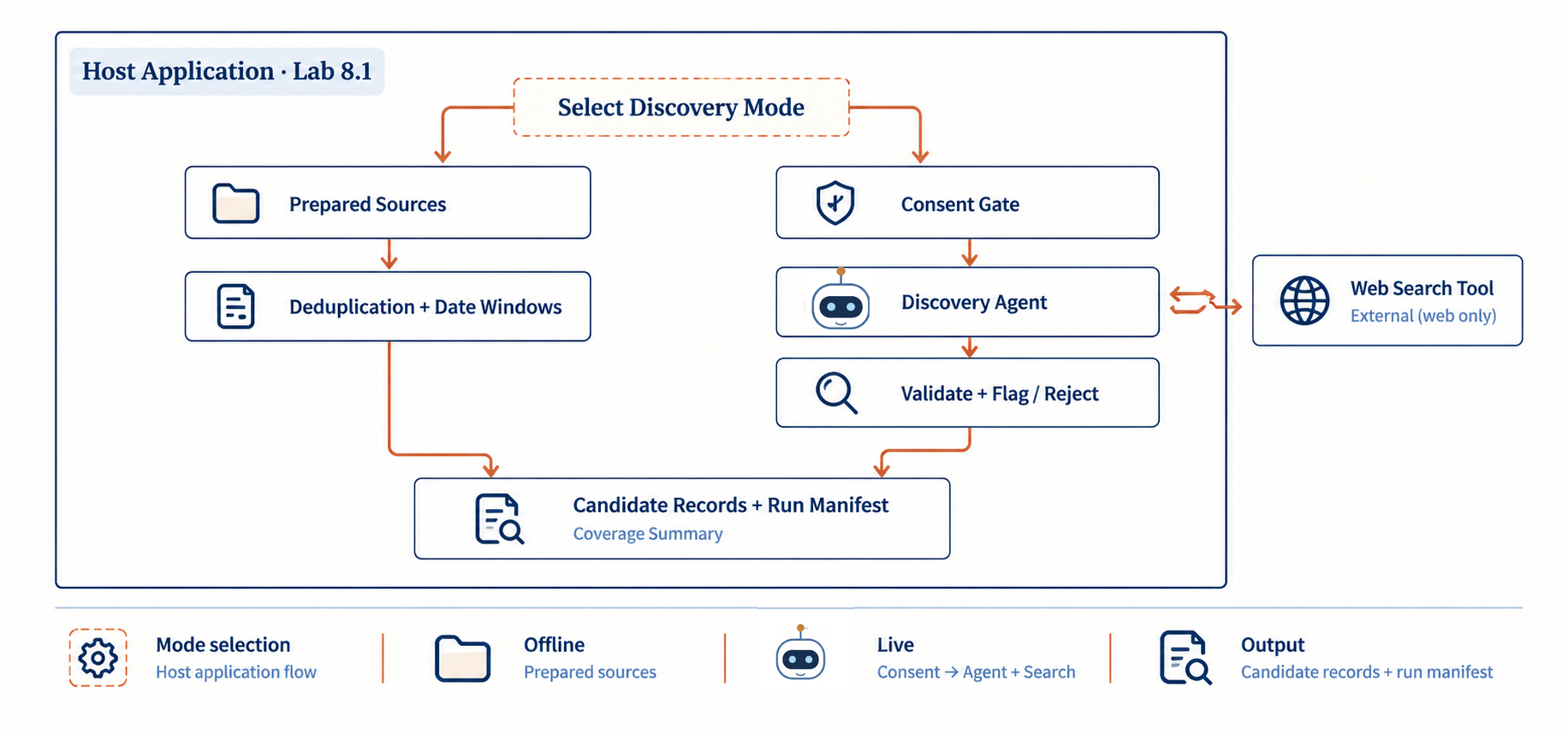
The host application selects and executes the mode. Offline discovery reads prepared data and performs deduplication and date-window processing; it does not invoke the Discovery Agent. Live discovery asks for permission before initiating the agent run, then applies application-side checks to the returned leads.
From Search Results to Candidate Records
In live mode, the Discovery Agent chooses searches and returns structured leads. The hosted WebSearchTool performs the external searches. The application then checks URLs, duplicates, dates, source types, and role relevance.
Here is the Discovery Agent and the call that runs it, from lab8/app/live_discovery.py:
agent = Agent(name='PM Role Discovery Agent', instructions=SEARCH_INSTRUCTIONS,
              tools=[WebSearchTool()], output_type=LiveDiscoveryOutput)
run = await Runner.run(
    agent,
    f'As-of date: {as_of}. Carry out all three search strategies.',
    max_turns=8,
)
You’ve seen this pattern before: an Agent with the hosted WebSearchTool() from Module 2, and an output_type that requires a structured result, as in Lesson 6.2. LiveDiscoveryOutput contains a list of leads, each with a title, employer, URL, discovery strategy, and any stated publication date, plus a list of limitations. Only Live Mode runs this code; Offline Mode never creates the Discovery Agent.
The agent’s instructions describe three search strategies: two job searches and one article search. Each lead it returns is labeled with one of four discovery categories, because the second job search can find either hands-on or strategic PM roles. The application checks that every label is one of the four. Search strategies and lead categories are not the same thing.
Each accepted live candidate is labeled unverified_search_lead, with content_basis: snippet. This matters: the description is not proof that the full original source was retrieved or verified.
Consider a search result titled AI Product Builder whose URL points to a Senior AI Analyst posting. The application flags the mismatch for verification rather than silently rewriting the title or treating the result as confirmed. A flagged lead is kept out of the accepted candidates and recorded as needs_verification; it is not rejected as irrelevant. Clearly unrelated roles are rejected instead. Both kinds are recorded, with reasons, in discovery_rejections.json. This relevance screening and the rejection file apply to live discovery; offline discovery uses its prepared snapshot and does not perform role screening.
The resulting records also preserve available source dates. When a posting date is unknown, it remains unknown. Date coverage is measured relative to the run’s recorded as_of date.
Lab 8.1: Run Source Discovery
Extract the ZIP and open a terminal in the lab-08 folder. Offline mode needs only Python 3.12: no packages to install and no API key.
From the extracted lab-08 folder, run:
python lab8/labs/lab8_1_source_discovery.pyOn macOS or Linux, if python isn’t found, use python3 for the lab commands in this module.
Start with offline mode. It runs without web search or model calls. Review the console summary and inspect the output directory:
lab8/data/runs/<run_id>/
The default offline run uses demo as its run ID. Inspect:
candidates.json: source candidates and available metadata.run_manifest.json: mode, run information, and theas_ofdate.
For the current prepared snapshot, the offline date coverage summary reports:
| Summary line | Count |
|---|---|
| Candidates discovered | 12 |
| Job postings / articles | 10 / 2 |
| Dated within 12 months | 4 |
| Dated 12 to 24 months | 1 |
| Unknown date | 6 |
| Outside 24-month window | 1 |
Six candidates are short excerpts from real job postings and articles. The other six are synthetic examples about fictional companies, marked synthetic: true and “(fictional)”. They add dated postings and edge cases so the later labs have something to compare; they are not research evidence.
Several sources have no known date, which limits what Lab 8.3 can compare. The one source outside the 24-month window is a synthetic article. Offline discovery keeps all 12 candidates; Lab 8.3 later excludes that article from its counts. These are prepared teaching inputs, not newly discovered live evidence.
Optionally, select live mode. It requires the packages in the lab’s requirements.txt, installed in a virtual environment in the lab-08 folder as described in the README, and an OPENAI_API_KEY, set in your terminal or in a .env file in the lab-08 folder (copy .env.example). The application requests explicit consent before beginning a potentially chargeable, bounded agent run. Selecting No stops before any API calls. Live results vary; use a fresh run ID rather than reusing a saved live output directory.
A successful live run also writes:
live_search_output.json: raw Discovery Agent output.discovery_rejections.json: leads that were rejected or held for verification, with their reasons; it can be an empty array.
A failed or incomplete run may not produce every output file.
What to Notice
- The host application controls both modes and writes the files. The Discovery Agent does not control the overall pipeline.
- Only live mode invokes the Discovery Agent and hosted web search.
- A flagged title/URL conflict requires further verification; it is not automatically a confirmed irrelevant role.
- Accepted live candidates are search leads based on snippets, not validated evidence records.
- Candidate counts and date coverage help assess the discovery set, but do not establish research quality by themselves.
Next: Evidence Analysis
We’ve identified potential sources, but we still need to examine what their content supports. In Lesson 8.2, we’ll analyze source material, classify responsibilities, and record uncertainty.
Live evidence analysis: Lab 8.2 can also analyze a completed live Lab 8.1 run. It does not search again. With your consent, the application retrieves each candidate’s original page once, then the Evidence Agent analyzes the retrieved text, one model call per retrieved page. Pages that cannot be retrieved are recorded with the reason, never analyzed from the search snippet. Labs 8.3 and 8.4 can then compare and report on that live run without further model calls. The exercises use offline mode by default.
The distinction to remember: discovery produces leads; evidence analysis evaluates support for claims.
Test Your Understanding
Question 1 of 3
Why does live discovery search for both Product Builder titles and traditional PM positions?