When Permission Is Not Enough
In Lesson 9.2, we learned how the Governance Gateway controls which tools agents can use and how those tools may be used.
But some actions require more than tool permission.
Our Publication Review Agent independently examines a research brief and may recommend publishing it. That recommendation is a judgment about the research, not authorization to publish.
Even when a publication request is permitted under policy, an authorized human reviewer must approve it before execution.
From Recommendation to Action
Our application separates three decisions:
| Decision | Who makes it? |
|---|---|
| Should the research be proposed for publication? | Publication Review Agent |
| Can the publication request proceed under policy? | Governance Gateway |
| Should this specific publication be authorized? | Human reviewer |
If the agent recommends publication, the application creates a publication request.
The agent can instead return not_proposed or needs_human_review_before_proposal. Neither creates a publication request. The second asks a person to assess the brief before anyone proposes publishing it, which is different from a reviewer approving or rejecting a request that already exists.
The agent does not directly publish the report. The application submits the request through the Governance Gateway, which enforces the approval requirement.
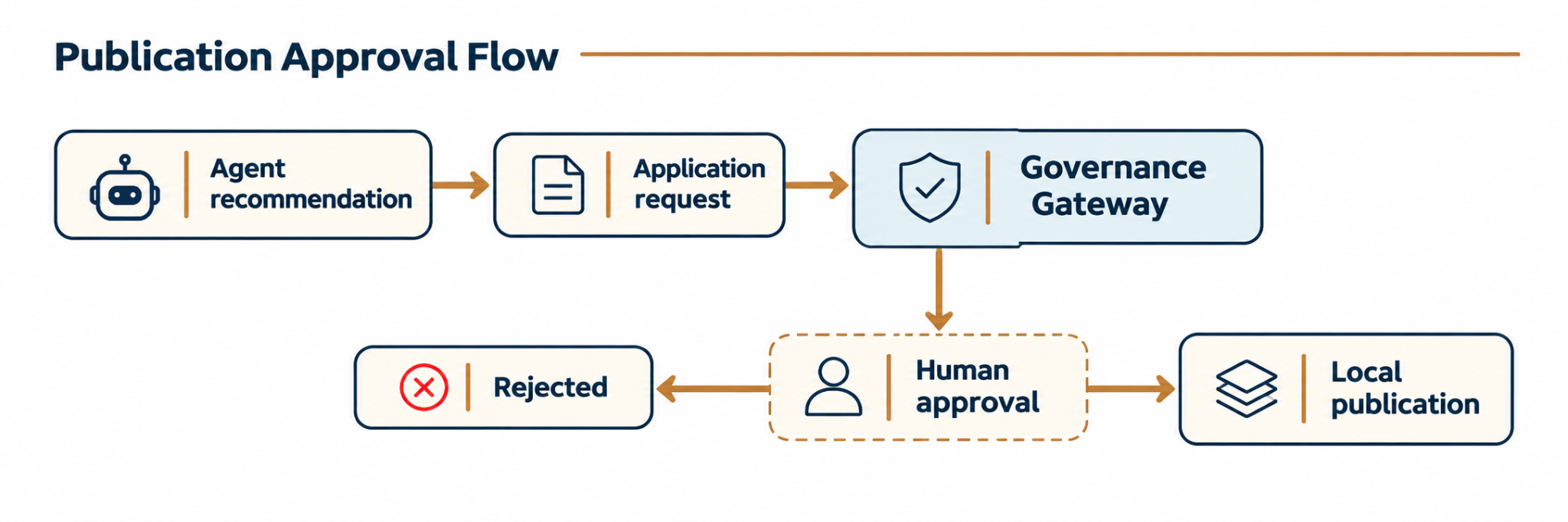
What Does the Human Actually Approve?
Human approval applies to a specific action and report, not a general instruction to let the agent publish.
In Lab 9, the publication request identifies the action and the content to be published. The Gateway also records a content fingerprint, a hash that identifies the exact version of the report.
Before publication, the application checks that the content still matches what was approved. If it has changed, the original approval cannot be used.
Approval is tied to the specific action and content.
Authorized Reviewer vs. Any Human
Human approval is meaningful only when the person providing it is authorized.
Lab 9 uses a simplified reviewer identity. The configured authorized reviewer is:
Authorized reviewer ID for Lab 9
research_leadFor example, an approval attempt using reviewer ID 1 is refused, and the request stays pending. An approval using research_lead is accepted, and the simulated publication executes. You’ll try both in the exercise below.
Human involvement is not the same as authorized human approval.
Lab 9 uses a manually entered reviewer ID. A production system would verify the reviewer’s identity through authentication.
A Publication Request Has Its Own Status
The agent’s publication recommendation and the application’s execution status are separate records.
For example, the agent may recommend:
proposed_for_publication
That recommendation remains unchanged as the publication request progresses.
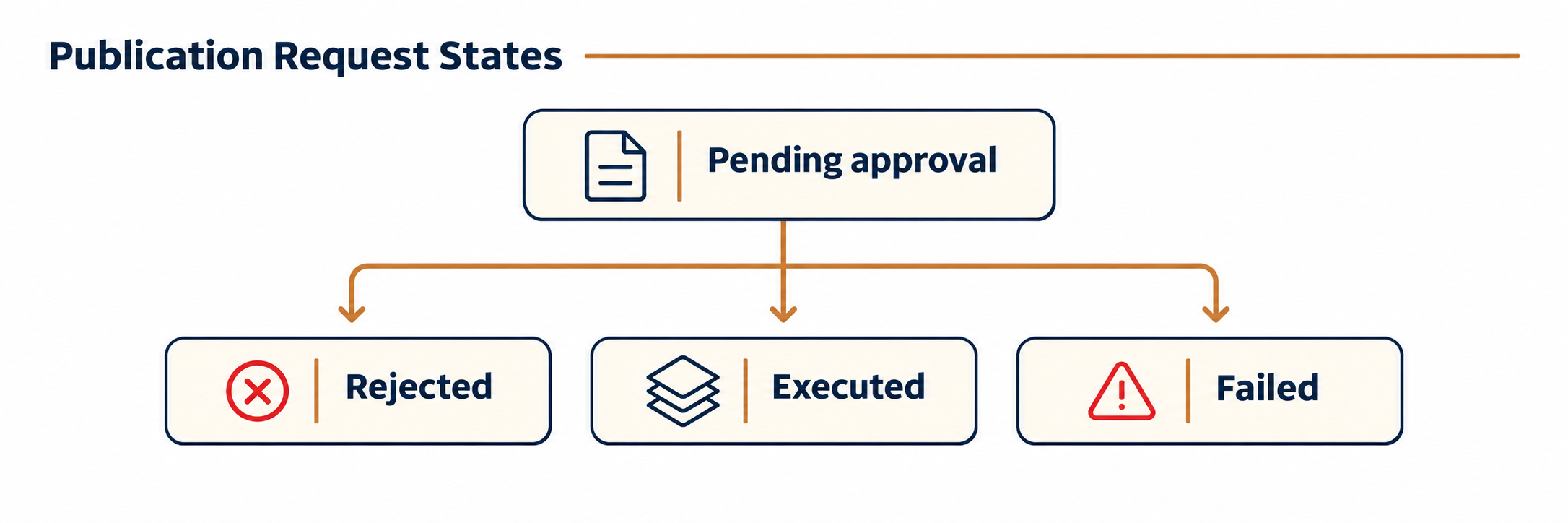
| Status | Meaning |
|---|---|
PENDING_APPROVAL |
Waiting for an authorized reviewer’s decision |
REJECTED |
An authorized reviewer rejected the request |
EXECUTED |
The approved publication completed |
FAILED |
An execution attempt failed |
An unauthorized approval leaves the request in PENDING_APPROVAL.
The agent’s original recommendation never changes. The request status changes independently to reflect what happened: approval and execution, rejection, or failure.
Lab 9.3: Review a Publication Request
In this exercise, follow a publication request through human authorization using prepared research. You do not need to repeat paid live research.
Follow the Approval Sequence in Your Terminal
From the extracted lab-09 folder, start the application:
python -m lab9.runSelect the offline research workflow, option 1.
The workflow ends with a pending publication request. The last lines of the output show the agent’s recommendation, the request’s status, the request ID, and the review command for your session:
Publication review (prepared): proposed_for_publication (a recommendation)
[APPLICATION] publication_review_agent publish_report research_offline-20261102T063400Z-brief-2: REQUIRE_APPROVAL / PENDING_APPROVAL - Requires action-specific human authorization
...
Pending human approval: publish_report 19ce3a1784dee10f for research_offline-20261102T063400Z-brief-2
  Review with: python -m lab9.review research_offline-20261102T063400Z
Your session ID, request ID, and timestamps will differ. Use the values printed by your own run.
Open the review interface with your session ID:
python -m lab9.review <session_id>It displays the pending request and asks two questions:
Type APPROVE or REJECT (anything else skips):
Enter reviewer ID:
Each review command handles one decision. Run it again for each attempt.
- Locate the agent’s recommendation and the request’s current status in the workflow output.
- Run the review command. Enter
APPROVEwith reviewer ID1and observe the refusal:Refused: Reviewer '1' is not authorized. Still pending. - Confirm that the request remains
PENDING_APPROVAL. - Run the review command again. Enter
APPROVEand the authorized reviewer IDresearch_lead. - Confirm that the request reaches
EXECUTEDand locate the report in the simulated local publication destination,lab9/published/approved_internal_portal/.
Approval applies to one specific pending request. Do not reuse a request that has already been executed or rejected.
The application records the decisions and outcomes. We’ll inspect those audit records in Lesson 9.4.
What We Learned
Permission to request an action is not the same as authorization to execute it.
In Lab 9, the agent recommends publication, the application submits a governed request, and an authorized human approves the specific action and content before execution.
The original agent recommendation stays unchanged, while the request status records what actually happened.
In Lesson 9.4, we’ll examine audit records, failures, and recovery.
Test Your Understanding
Question 1 of 3
The Publication Review Agent recommends publishing a research brief. What authorizes the publication?