From a decision to an action
In Lesson 2.1, we established why agents need tools. A language model can interpret information and decide what to do, but it cannot independently execute arbitrary operations in an application or external system.
So how does a decision made by a language model become an action performed by software?
The answer lies in the interaction between four components:
- Agent configuration: Defines the agent’s instructions, model, and available tools.
- LLM: Interprets the task, decides whether to request a tool, generates the tool arguments, and evaluates returned results to decide what to do next.
- Runner / execution runtime: Coordinates communication between the model and tools, invokes the appropriate tool implementation, and passes results back to the model.
- Tool implementation: Executes the requested operation when invoked and returns its output or error to the runtime.
Together, these components form a system in which the model makes decisions, the runtime coordinates execution, and tools perform operations.
How the components work together
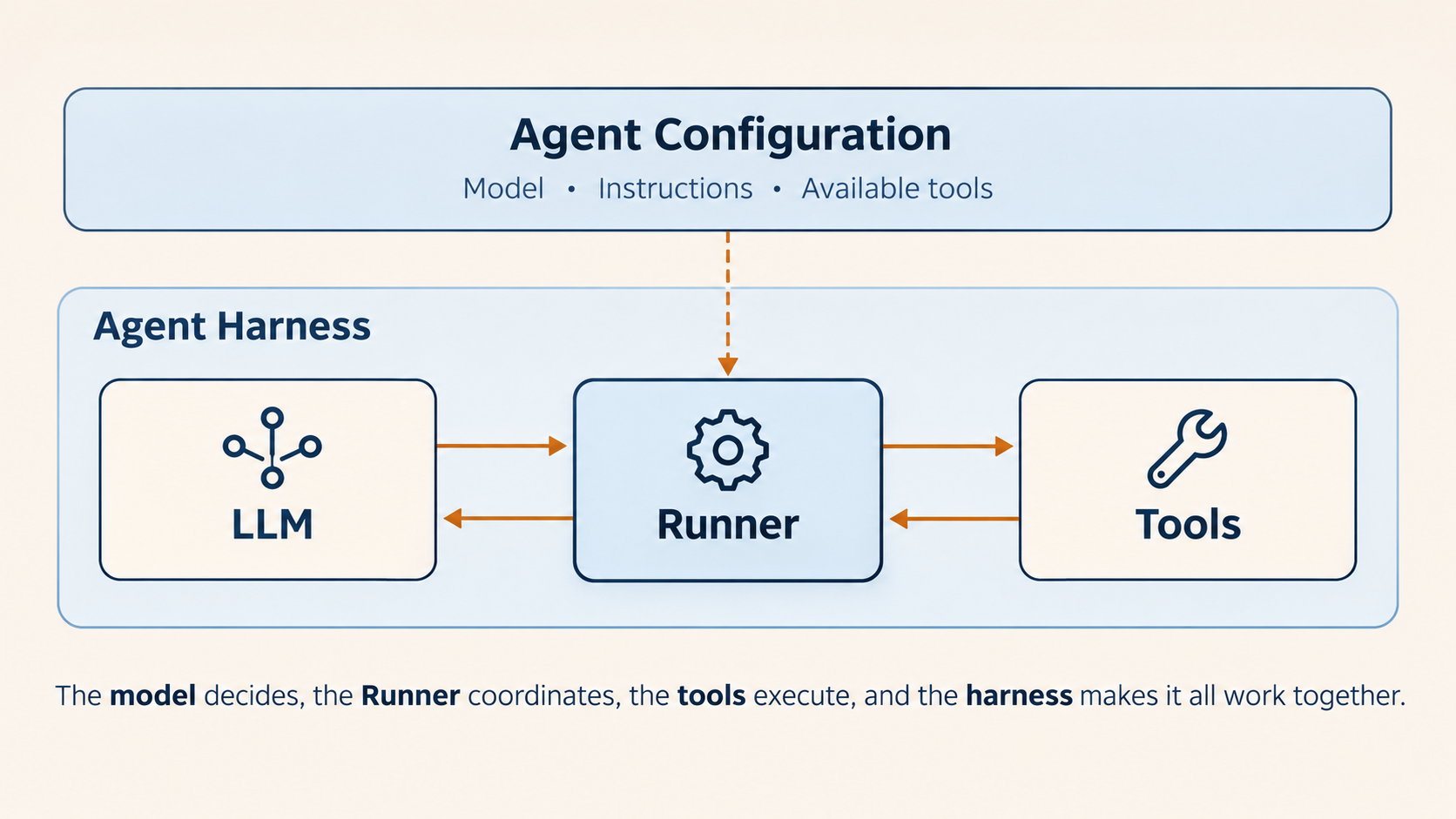
The diagram shows the main components involved in the agent loop, with the Runner coordinating interactions between the model and the tools. The shaded region groups components participating in execution. Section 1 explains the Agent Harness as the supporting software infrastructure.
The LLM requests a tool through the Runner. The Runner invokes the tool and returns its result to the LLM. The model can then use the result to generate a final response or request another tool.
The loop may repeat until the agent completes its task or reaches an execution limit.
1. Configuration and execution
In Module 1, we saw that defining an agent does not mean the agent is already executing. The same applies to its tools.
An agent definition is a configuration: its instructions, model, and available tools. Execution begins when the application invokes the Runner with that configuration and a task. The model then makes decisions, the Runner coordinates any tool operations it requests, and the result returns to the application.
The agent harness
The agent harness is the software infrastructure surrounding the language model that enables an agent to operate. It manages the execution loop, connects the model to tools, handles context and results, and supports execution controls. The Runner is the part of the harness we work with directly in our labs.
The harness isn’t unique to one agent: the same infrastructure can run many agents with different configurations. An agent framework, such as the OpenAI Agents SDK, provides the reusable building blocks for creating it.
2. Who is responsible for what?
| Component | Responsibility | What it does not do |
|---|---|---|
| Agent configuration | Defines the model, instructions, and available tools | Does not execute the task by itself |
| LLM | Interprets the task, requests tools with arguments, evaluates results, and decides whether to continue or respond | Does not directly execute tool code |
| Runner / execution runtime | Manages the execution loop, invokes tools, and returns their results to the model | Does not independently make the model’s decisions |
| Tool implementation | Executes the requested operation and returns an output or error | Does not independently decide when the agent should use it |
These are responsibilities, not necessarily four separate services. Their implementation depends on the agent framework and application architecture.
A tool might be a local function, a service call, or a hosted capability. The important distinction is that the model requests the operation, while the execution runtime arranges for it to happen.
3. How the components fit together
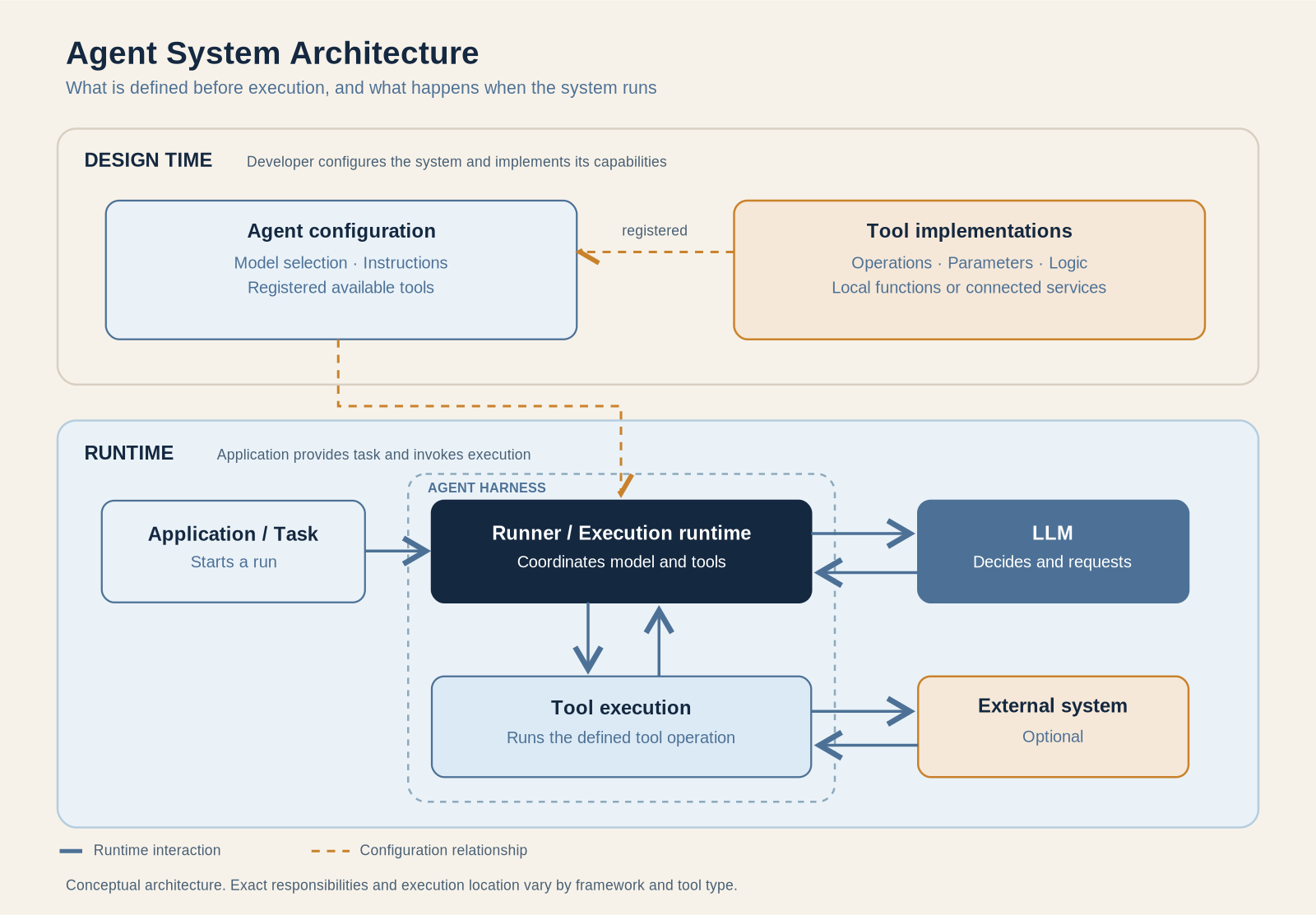
The diagram distinguishes two phases:
Design time: The developer defines the agent configuration and implements or connects the available tools.
Runtime: The application supplies a task and invokes the Runner. The Runner interacts with the LLM, receives tool requests, executes them through the appropriate mechanisms, and returns results.
Notice the subtle Agent Harness boundary. It represents the execution infrastructure coordinating the system, not an additional intelligent component making decisions.
The LLM is shown as a distinct component connected to that infrastructure.
The diagram also distinguishes two types of connection:
- Dashed copper lines: Relationships established through configuration.
- Solid blue lines: Interactions that occur during execution.
This separation helps us understand an important principle: making a tool available to an agent is different from actually calling that tool.
4. Registering a tool
Let’s look briefly at how these responsibilities appear in code.
The example below uses the OpenAI Agents SDK:
from agents import Agent, Runner, function_tool

@function_tool
def get_research_source(source_id: str) -> str:
    """Retrieve a research source by its ID."""
    return f"Research source: {source_id}"

agent = Agent(
    name="Product Strategy Research Agent",
    instructions="Use available research sources when needed.",
    tools=[get_research_source],
)

result = Runner.run_sync(
    agent,
    "Retrieve research source builder_pm_001."
)

print(result.final_output)
Three things are happening here.
First, we define a tool.
The get_research_source function implements the operation. Its name, description, and input parameters tell the model what the tool does and how to call it.
Second, we register that tool with the agent.
The tools list makes the tool available to the model during execution. Registering the tool does not execute its code.
Third, we invoke the Runner.
Runner.run_sync() starts execution with the configured agent and the supplied task.
The model may then request get_research_source, passing source_id as an argument. The Runner coordinates the tool call and supplies its result back to the model.
For now, the tool simply returns a string containing the supplied source ID. It doesn’t retrieve a research record. In Lesson 2.3, we’ll implement the actual retrieval and inspect how the tool executes.
5. What happens during a tool call?
Now let’s follow one complete execution.
Suppose our Product Strategy Research Agent receives the task:
Retrieve research source builder_pm_001 and explain its significance.
The agent has access to a tool named get_research_source.
Runtime Execution Sequence
Watch requests and results travel between the application, execution runtime, model, and tool.
Follow the exchange
Select Play or Next to see the communication progress. Only the active exchange becomes solid orange. Earlier exchanges fade.
Dashed = upcoming · Solid orange = current exchange · Faded = completed. The model requests a tool; the Runner coordinates its execution.
Use the animation controls to follow the communication between the Application, Runner, LLM, and Tool. The arrows show the direction of each request and response.
The execution unfolds as follows:
- Application → Runner: The application starts execution with the agent configuration and task.
- Runner → LLM: The Runner supplies the task, instructions, and available tool definitions to the model.
- LLM → Runner: The model generates a structured request to use
get_research_source, including its arguments. - Runner processes the request: The runtime identifies the registered tool, processes its arguments, and applies any configured execution controls.
- Runner → Tool: The runtime invokes the actual tool implementation.
- Tool → Runner: The tool executes and returns its result.
- Runner → LLM: The Runner supplies the tool result to the model.
- LLM → Runner: The model evaluates the result and either requests another operation or generates a final response.
- Runner → Application: When the model completes, the Runner returns the final response to the application.
Watch what happens at Steps 3 and 5.
At Step 3, the model requests a tool.
At Step 5, software actually executes that tool.
Those are different events, coordinated by different parts of the system.
Also notice that the model and tool do not communicate directly in this architecture. The Runner coordinates the exchange in both directions.
The animation shows a single successful tool call. In practice, the model might make several calls, request a different tool, or respond without using a tool at all.
6. How does the model know which tool to request?
When a tool is registered, the model receives information describing how it can be used.
This typically includes the tool’s:
- Name: Identifies the available operation.
- Description: Explains what the operation does and when it is useful.
- Input schema: Describes the arguments the operation expects.
For example:
Tool: get_research_source
Description: Retrieve a research source by its ID.

Inputs:
  source_id: string
The model uses this description, along with the task and conversation context, to decide whether the tool is appropriate.
If it chooses the tool, it produces a structured request conceptually similar to:
{
  "name": "get_research_source",
  "arguments": {
    "source_id": "builder_pm_001"
  }
}
This is not the result of executing the tool.
It is a request for the execution runtime to perform an operation using the supplied arguments.
The runtime must then connect that request to an actual implementation.
7. What if the request is invalid or the tool fails?
A model can select the wrong tool, supply an invalid argument, or request a record that does not exist.
It’s useful to distinguish three different situations:
Invalid argument structure
The tool expects a particular input format, but the supplied arguments do not satisfy its schema. The framework or tool implementation may reject the request.
Valid argument, unavailable information
A source ID might be a valid string but refer to a record that does not exist. Passing schema validation does not establish that the requested record is available.
Execution failure
The tool might encounter a network error, unavailable service, timeout, or other operational failure.
Depending on the framework and application design, these conditions may be surfaced to the model, handled by application code, retried, or cause the run to stop.
The Runner coordinates the execution process, but validation, permissions, retries, and error handling are not automatically guaranteed simply because an application uses an agent framework.
They must be supported and configured appropriately.
This becomes especially important when agents interact with enterprise systems.
8. What to remember
Tool calling is a coordinated exchange between the model and the execution runtime. The model decides what operation to request and how to use the result. The runtime coordinates execution, while the tool implementation performs the operation and returns the result to the model.
Test Your Understanding
Question 1 of 3
An agent is created with tools=[get_research_source]. Before Runner.run_sync() is called, what has happened?