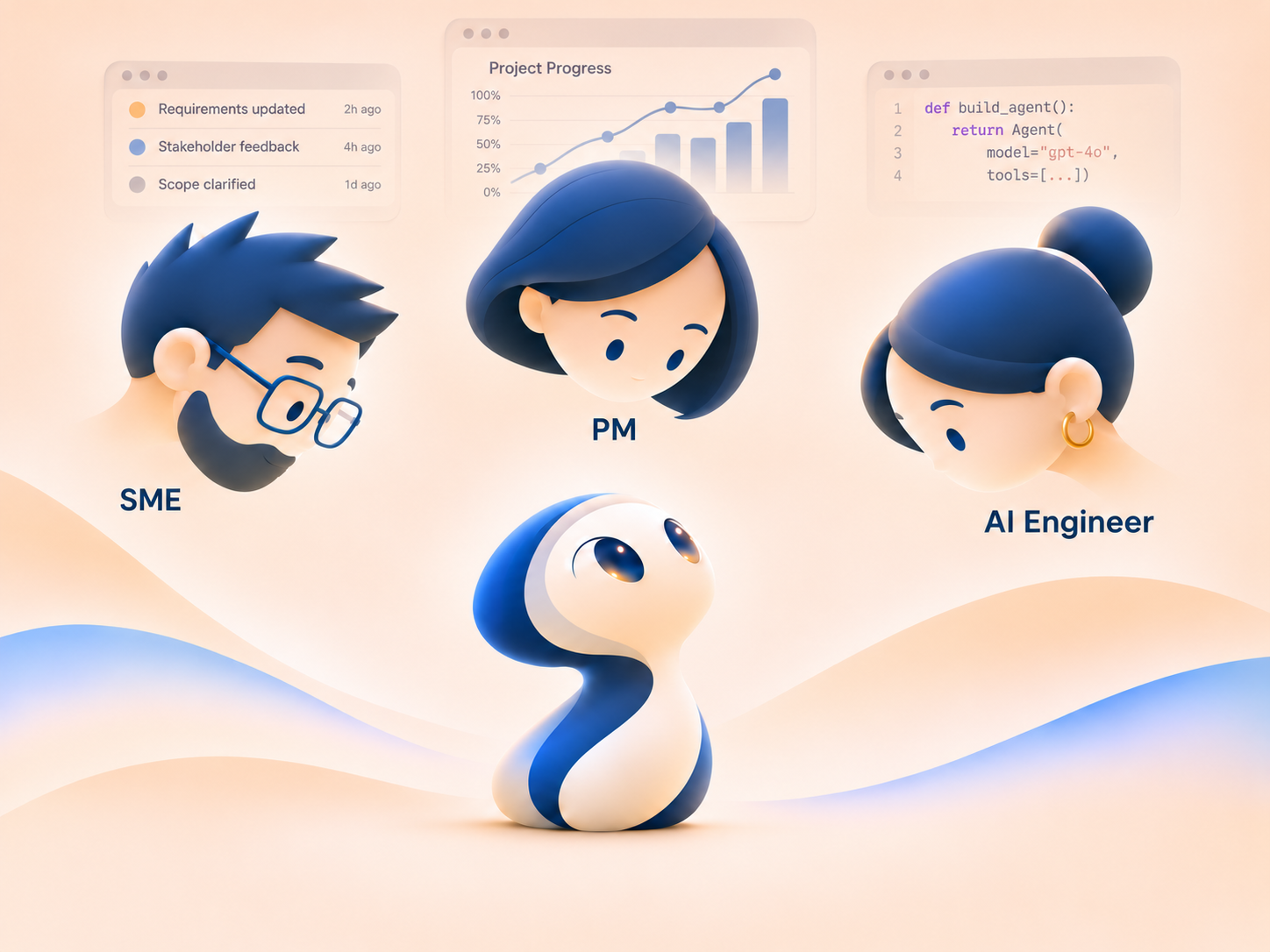
What happens after we release an agent?
We have built an agent, connected it to tools, tested its behavior, and added controls over what it can do. Let’s imagine that people are now using it.
How do we know it is doing a good job?
A run can finish without an error and still produce a poor answer. A source may be out of date. The agent may overlook a warning from a tool or make a claim that the evidence does not support. Some problems are easy to catch with code. Others need a person who understands the subject.
Shipping an agent is not the end of the product lifecycle. We still need to see what it does, check the quality of its work, fix problems, and make sure our changes do not break something else.
Modules 7 and 9 introduced evaluation, traces, permissions, and audit records. Here we will put them together into a process a product team could actually use after release.
We will follow this loop:
Observe → Evaluate → Diagnose → Improve → Test → Release & Monitor
We will also use the PM Role Trends Research Agent from the course as an example. The production situations described here are hypothetical. Our course application is a learning project, not a deployed production service.
1. What does good performance mean?
With conventional software, we often know something is wrong because a service fails, a calculation returns the wrong number, or an API sends an invalid response.
An agent can have those problems too. But it can also use its tools correctly and still reach a questionable conclusion.
Imagine that our research agent produces a brief about changes in product manager roles. It runs successfully, includes citations, and follows the required format. A reader then notices that several job postings are old and that the brief treats a few examples as evidence of a broad trend.
The workflow succeeded. The research did not meet our expectations.
That is why we need to watch more than technical errors.
| What we check | Questions to ask | What might help us answer |
|---|---|---|
| Reliability | Did the workflow finish? Did tools fail? | Errors, timeouts, retries |
| Answer quality | Is the result accurate, useful, and clear about uncertainty? | Reviewed outputs, evaluation cases, user corrections |
| Sources | Are the sources relevant, current enough, and traceable? | Dates, links, source records |
| Permissions | Did the agent stay within its allowed actions? | Policy decisions, approvals, denials |
| User value | Did the result help someone complete the task? | Feedback, accepted work, rework |
| Time and cost | Is the work taking too long or costing too much? | Run time, tool usage, model costs |
Not every agent needs the same checks. Our research agent needs careful source review. An agent that updates financial records needs much stricter checks on permissions and actions.
We should decide what matters for the product before deciding which metrics to collect.
2. Observe: what happened?
The first step is to notice a problem or a change. We might hear about it from a user, see it in a sample of completed work, or find it through automated monitoring.
When we investigate, two kinds of records are especially useful: execution traces and audit logs. They are related, but they do different jobs.
Traces show how a run unfolded
A trace helps us follow the steps the agent took. Depending on the tools we use, it may show model calls, tool calls, timing, errors, and handoffs between agents.
For example, a trace from our research agent might show that it:
- Searched for recent product manager job postings.
- Received both new and old postings.
- Opened some of those sources and extracted details.
- Passed the findings to another agent for review.
- Produced a brief or stopped for human approval.
If the final brief contains an outdated source, the trace can help us find where the problem began. Did the search return the wrong material? Did a tool fail to extract the posting date? Did the agent have the date but ignore it?
A trace can explain the sequence. It does not prove that the answer was good or that an action was allowed.
Audit logs show actions and decisions that need accountability
An audit record answers a different set of questions. What action was requested? Who or what requested it? Was it allowed? Was approval required? What happened?
In Module 9, we built a gateway that checks tool requests against application rules and records important decisions. We also introduced a human approval step for publication.
Suppose someone asks, “Was this brief approved before publication?” We should be able to find that answer in the audit records.
If someone asks, “Why did the review agent reject the brief?” We may need the trace to understand the sequence and the reason.
| Execution trace | Audit record | |
|---|---|---|
| Main question | How did the run unfold? | What action or decision occurred, and who was responsible? |
| Common details | Tool calls, model calls, handoffs, errors, timing | Requesting identity, action, permission result, approval, time |
| Most useful for | Investigating behavior | Checking permissions and accountability |
| Does not prove | That the answer was correct or the action was authorized | That the final answer was good |
Where useful, we should be able to connect a trace and its audit events using a run ID or another identifier.
We also need to be careful about what we store. Traces may contain prompts, documents, or tool results with sensitive information. Access and retention rules are part of the design, not something to decide later.
What should we watch regularly?
Start with a few signals the team can act on: failed runs, blocked tool requests, unusual time or cost, poor answers found during review, and user feedback.
Look at specific examples, not only averages. A good overall score can hide a serious problem that affects one type of request. High-risk actions may need to be reviewed individually.
3. Evaluate: was the result good enough?
Once we see what happened, we need to judge the result.
For the research agent, we might ask:
- Are the cited sources recent enough for the question?
- Can a reader check where a claim came from?
- Does the brief separate evidence from interpretation?
- Does it acknowledge when the sample is small or incomplete?
- Were publication and tool-use rules followed?
Some questions are straightforward to check in code. We can confirm that a required field exists, that a date is present, or that an unapproved action was blocked.
Other questions require judgment. A source can have a date and still be irrelevant. A sentence can be clear and still misrepresent the evidence.
We therefore need a combination of checks:
Automated checks catch things that can be stated as clear rules, such as missing fields, invalid formats, or broken permission checks.
Evaluation cases give us a repeatable set of tasks and expected behaviors. We include typical examples, difficult cases, and failures we have seen before. An evaluation case does not always require one exact correct sentence. It may instead describe what a good result must include or avoid.
Human review helps with questions that depend on meaning or domain knowledge. A subject-matter expert (SME) can tell us whether an answer uses the evidence fairly or leaves out something important.
We can use an AI-based evaluator to help review larger numbers of results. But we still need to check that its judgments agree with trusted human reviews, especially for important decisions.
Agents may produce somewhat different results from one run to another. Passing a test once is not enough for every situation. For important cases, we should repeat tests and look at the kinds of failures, not just an overall pass rate.
4. Diagnose: where did the problem start?
Finding a bad answer is only the beginning. Before changing the agent, we need to understand why it happened.
Consider the outdated job posting in our example. We should not immediately rewrite the prompt and hope for a better result.
Instead, we can look at several possible causes:
| Possible cause | What we would investigate |
|---|---|
| Source selection | Did the search bring back material outside our intended date range? |
| Missing information | Did the source extractor lose the posting date? |
| Model behavior | Did the agent ignore a date or make a stronger claim than the evidence supported? |
| Tool behavior | Did a tool return incorrect or misleading fields? |
| Agent handoff | Was a warning lost when one agent passed work to another? |
| Application rules | Should the application have blocked or flagged this source before it reached the brief? |
These causes lead to different fixes.
If the tool failed to return a required date, changing the prompt alone is unlikely to solve the problem reliably. If the agent ignored a valid warning, we may need to change instructions or the handoff. If a rule can be enforced in code, that may be more reliable than asking the model to remember it.
AI engineering usually leads the technical investigation. SMEs help decide what is wrong with the content. Product management (PM) helps judge how much the problem matters to users and how soon it should be fixed.
The goal is to leave the investigation with a plausible cause and a way to check whether the fix works.
5. Improve: turn one failure into a lasting test
Let’s follow the research example from beginning to end.
This is a hypothetical example of how a team might handle a problem after release.
We notice a problem. A reader points out that a research brief uses an older job posting as evidence of current hiring trends.
We check the result. An SME agrees that the posting is too old for that claim. PM decides the issue matters because the brief could give readers the wrong impression of today’s market.
We investigate. AI engineering reviews the trace. The retrieval step included the posting date, but the agent did not apply the date requirement when writing the brief.
We save a test case. Instead of only correcting this brief, we add the situation to our evaluation set. The expected behavior is clear: prefer sources from the last 12 months; use sources up to 24 months old for context only when the reason is stated; do not silently present older material as current evidence. These are choices for our course research project, not rules for all agents.
We make a focused change. The team adds a source-date check in the application and updates the agent’s instructions for handling older sources. We also check whether the review agent notices unsupported claims about recency.
We test it. We run the new case and the existing evaluation cases. An SME reviews sample briefs to see whether the change improves the research without removing useful historical context.
We release and keep watching. After the normal checks and approvals, we release the change. We then review new outputs to see whether the same problem returns or a different problem appears.
The important point is simple: fixing one answer is not enough. We want to make the same mistake less likely in future runs.
The quality-improvement loop
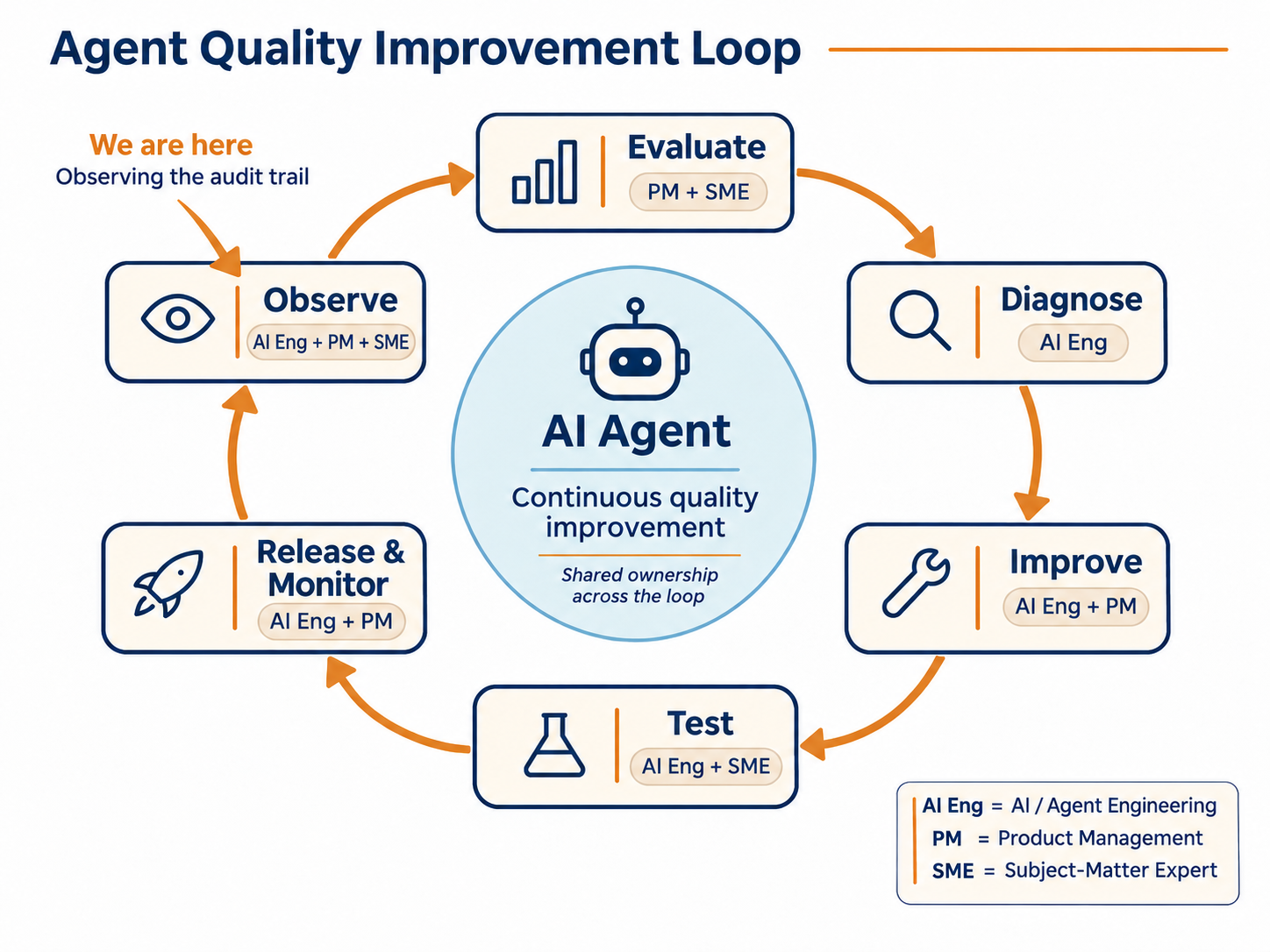
The diagram’s “We are here” note points to observing an audit trail, which was where we first discussed this topic. In practice, observation also includes traces, outputs, feedback, and monitoring data.
6. Test, release, and monitor
Before releasing a change, we need to know more than whether the original problem is fixed.
We should also check that important earlier tests still pass, tool permissions and approval steps still work, and representative outputs remain useful. If we change prompts, tools, models, or workflow steps, we need to record what changed so we can investigate a new problem later.
For an agent whose answers vary between runs, it may help to test important scenarios more than once.
Release checks should match the risk. A read-only research agent does not need the same approvals as an agent that can change financial records or send sensitive information outside an organization.
Once a change is released, we return to observation. The new version may improve answer quality but slow down the workflow or increase cost. Or it may work well for the test cases but fail on a new kind of user request.
This is why the loop continues after every release.
7. Who is responsible?
The diagram identifies three groups: AI Eng, PM, and SME. They work together, but they do not do the same job.
AI / Agent Engineering (AI Eng) handles technical monitoring and investigations. The team maintains traces, automated evaluations, regression tests, and technical fixes. It also checks that tools and controls still work after changes.
Subject-Matter Experts (SMEs) judge the quality of the work itself. They help define what a good answer looks like, review samples, and find problems that a technical test may miss.
Product Management (PM) sets the product’s quality goals and priorities. PM looks at user needs, the impact of failures, and tradeoffs between quality, time, cost, and scope.
Here is how that plays out across the loop:
| Stage | People most involved | Their main work |
|---|---|---|
| Observe | AI Eng + PM + SME | Collect technical signals, user feedback, and content concerns |
| Evaluate | PM + SME | Judge whether results meet user and domain needs, with engineering supporting the tests |
| Diagnose | AI Eng | Find the likely technical cause, with help from PM and SMEs |
| Improve | AI Eng + PM | Make the change and decide its priority and scope |
| Test | AI Eng + SME | Run tests and review the quality of the result |
| Release & Monitor | AI Eng + PM | Approve and manage the rollout, then watch its effects |
These are the main participants, not the only people allowed to take part. Engineering is involved in evaluation even when SMEs lead the content review. Security, compliance, operations, or independent approvers may be needed for higher-risk systems.
A small team may have one person covering several roles. What matters is that the technical work, domain judgment, and product decisions all have an owner.
8. Make quality review part of normal work
How often should we review an agent’s quality? That depends on its usage and risk.
For a small, limited pilot, a short weekly review may be enough to start. Serious failures should be handled when they happen, not held for the next meeting.
The regular review is a chance to look for patterns and decide what to improve.
Before the review, AI engineering can bring a short summary of failures, changes in time or cost, evaluation results, and a few examples worth discussing. SMEs can bring findings from the outputs they reviewed. PM can bring user feedback and the problems that seem most important.
During the review, we can keep the discussion simple:
- What changed since the last review?
- Which examples show a real problem?
- Do we know why it happened, or do we need more investigation?
- What will we change, and who will do it?
- How will we know whether the change worked?
A small written record is enough to keep track of decisions:
| Item | Example |
|---|---|
| Problem | An older job posting was used as current evidence |
| Evidence | Reader feedback, source date, brief, trace |
| Why it matters | The brief may mislead readers about current PM roles |
| Likely cause | The date requirement was not applied when writing the brief |
| Next action | Add a source-date check and update the evaluation cases |
| People involved | AI Eng fixes and tests; SME reviews content; PM sets priority |
| Done when | The new case passes, earlier cases remain acceptable, and reviewed samples improve |
| Check again | Review new briefs after the change is released |
Not every problem requires a model change. Sometimes the right answer is to improve a tool, change an application rule, explain a limitation to users, or narrow what the agent is expected to do.
We do not need a large monitoring system to begin. We need enough information to spot important problems, people who review it, and a habit of turning findings into tested changes.
What should we remember?
Traces, audit logs, and evaluations help us answer different questions.
- Traces: What happened during the run?
- Audit logs: What was requested, allowed, denied, or approved, and by whom?
- Evaluations: Was the behavior or result good enough?
- Continuous improvement: What should we change, how will we test it, and what happens after release?
We cannot predict every problem before people start using an agent. But we can build a practical way to learn from what happens.
We are not finished when the agent goes live. We are responsible for what it does next.
Further reading
These references go deeper into the technical details. You do not need to read them to follow this appendix.
- OpenAI Agents SDK: Tracing (Python) — How the SDK records runs, tool calls, and other steps.
- OpenAI: Evaluate agent workflows — Ways to evaluate agent runs and behavior.
- OpenAI: Evaluation best practices — Building useful evaluation cases and judging results.
- OpenTelemetry: Semantic conventions for Generative AI — Shared terminology for recording AI application activity. Some conventions are still evolving.
- NIST AI Risk Management Framework: Measure — Guidance on measuring and tracking AI risks.
- NIST Generative AI Profile — Broader guidance on generative AI risks.