What Can We Actually Conclude?
We began Module 8 with a question: Is AI Changing the Product Manager Role?
We’ve discovered sources, examined evidence, and compared job expectations. Now comes the difficult part: deciding what we can reasonably say about what we’ve found.
A research brief should communicate the observations, explain what supports them, and make clear where the evidence falls short.
An inconclusive result can be a valid research outcome.
Building the Research Brief
In Lab 8.4, the application combines the outputs of the previous labs into a research brief.
It organizes the information into four types of claims:
- Observations: What individual source excerpts say, with references to the original records.
- Comparisons: Counts and groupings calculated in Lab 8.3.
- Hypotheses: Research propositions that have not been established.
- Interpretations: Possible implications that require human review.
The application builds these claims as structured data in research_brief.json, then renders the Markdown report, pm_role_trends_research_brief.md.
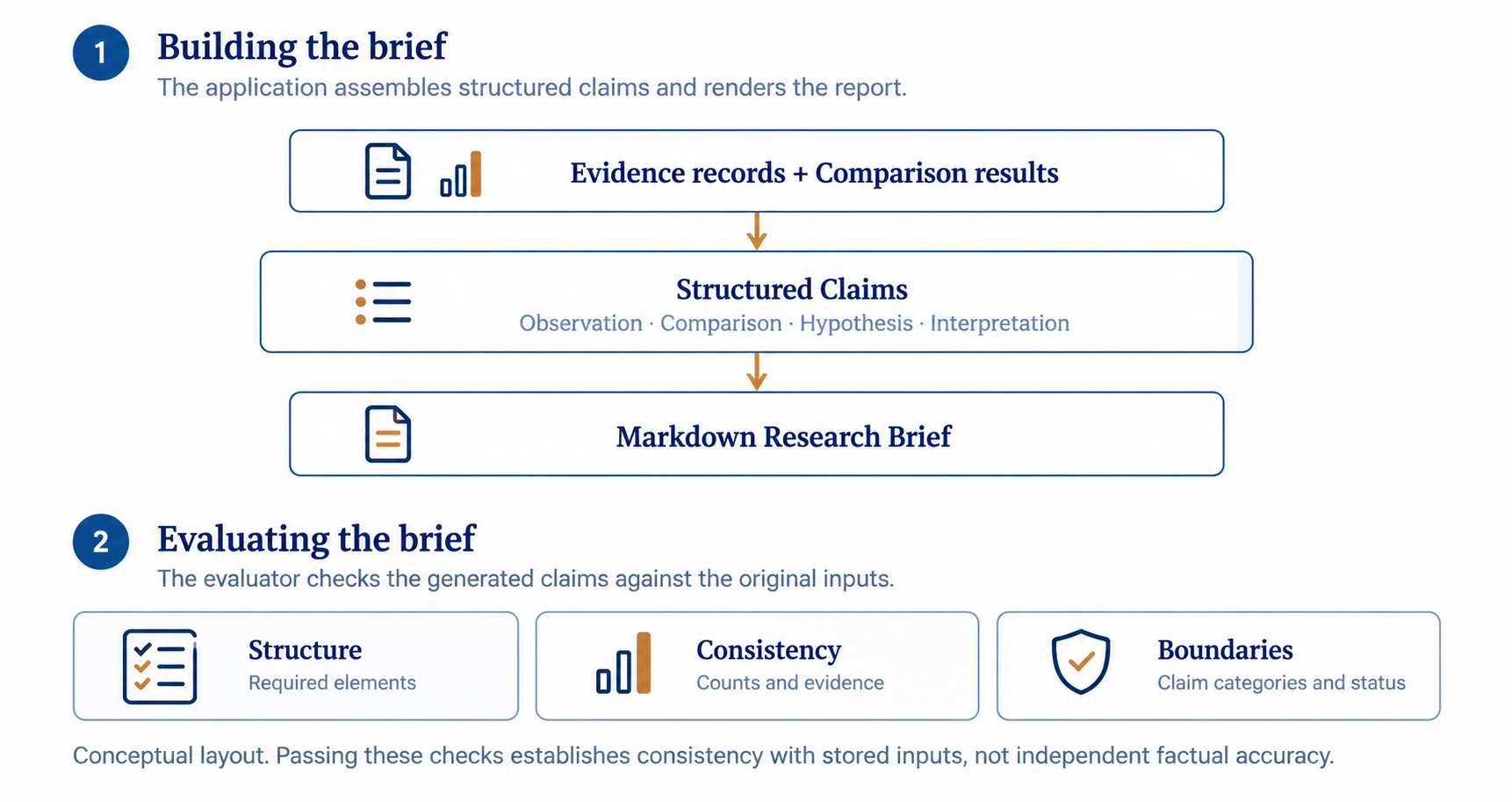
This process uses deterministic Python code. No AI agent, model, Skill, or MCP call is involved.
Some report content remains predefined, including the hypothesis assessments, possible implications, and suggested next research. The application does not independently evaluate the research hypotheses.
Can We Trust the Brief?
A report can look complete and still contain mistakes.
In Module 7, we introduced evaluation as a way to test whether an agent-based system meets defined expectations.
Here, we apply that principle to the research brief.
Lab 8.4 runs 25 deterministic checks across three areas:
| Evaluation area | What it checks |
|---|---|
| Structure | Required report elements are present |
| Consistency | Counts, quotations, source references, and provenance agree with the stored inputs |
| Claim boundaries | Observations, comparisons, hypotheses, and interpretations are identified and presented appropriately |
For example, if the report says six job postings qualified but Lab 8.3 counted five, the consistency check fails.
If a quotation is changed and no longer matches the stored evidence record, another check fails.
But there is an important limitation.
Passing all 25 checks means the brief is consistent with its stored inputs. It does not prove those inputs are correct.
The evaluator cannot determine whether a source is authentic, whether an excerpt supports the assigned classification, or whether a proposed market trend is real.
Those questions still require research judgment and additional verification.
Lab 8.4: Generate and Evaluate
From the extracted lab-08 folder, run:
python lab8/labs/lab8_4_research_brief.pyStart with offline mode.
The application uses the prepared teaching dataset and checks that the earlier lab outputs are available and consistent.
Live mode requires an existing research run containing the necessary evidence and comparison results. Lab 8.4 does not perform new searches or model calls.
Inspect the Results
Open the three generated files in:
lab8/data/runs/<run_id>/
| File | Purpose |
|---|---|
research_brief.json |
Structured claims and supporting report data |
pm_role_trends_research_brief.md |
Readable research brief |
evaluation_report.json |
Evaluation results and identified limitations |
In the offline dataset, a normal run passes all 25 checks.
However, the evaluation report also identifies work requiring human review, including unreviewed evidence, fictional teaching sources, and hypothesis assessments that were not derived from the data.
Test the Evaluator
Let’s see whether the evaluator can detect an inconsistency.
Create a separate offline run named count-test so the original demo files remain unchanged. Setting a run ID skips the mode prompt and uses offline mode.
macOS or Linux
LAB8_RUN_ID=count-test python lab8/labs/lab8_4_research_brief.pyWindows (PowerShell)
$env:LAB8_RUN_ID="count-test"; python lab8/labs/lab8_4_research_brief.py; Remove-Item Env:LAB8_RUN_IDOpen lab8/data/runs/count-test/research_brief.json and find the comparison claim with ID cmp-eligible. It represents the eligible job-posting count.
Our offline dataset has five eligible postings. Change its value from 5 to 6, leaving the comparison source data unchanged, and save the file.
Run the evaluator against that run using the existing evaluate_run(path) function:
python -c "import sys; sys.path.insert(0, 'lab8'); from app.experiments import evaluate_run; from app.paths import RUNS; e = evaluate_run(RUNS / 'count-test'); print(e['passed'], '/', e['total'], 'failed:', e['failed'])"Expected output:
23 / 25 failed: ['markdown_matches_brief', 'eligible_count_matches']The eligible_count_matches check fails because the reported value no longer agrees with comparative_analysis.json.
The generated Markdown also disagrees with the edited JSON. This is detected separately by markdown_matches_brief.
To restore the run, repeat the first command. Lab 8.4 regenerates the brief and passes all 25 checks again.
This experiment shows why checking the report against its inputs is stronger than simply checking whether expected text appears.
It also illustrates a boundary: if the underlying evidence contains an incorrect classification, the report can reproduce it faithfully and still pass evaluation.
What We Learned
Module 8 brought together source discovery, evidence analysis, comparison, and research reporting.
We built a research workflow that preserves source references, separates observations from interpretations, and checks whether the final brief agrees with its recorded inputs.
Our offline dataset includes fictional examples and cannot establish real-world PM hiring trends. Even with real sources, trustworthy conclusions require sufficient evidence and human review.
The central distinction is:
A validated report is not necessarily a validated conclusion.
In Module 9, Enterprise Governance, we’ll examine how to apply permissions, oversight, auditability, and operational controls to agent-based systems used in organizations.
Test Your Understanding
Question 1 of 3
Why does Lab 8.4 create research_brief.json before generating the Markdown report?