In Lesson 2.2, we followed the tool-calling loop: the model requests a tool, the runtime executes the call, and the result returns to the model. Now we’ll build a tool ourselves.
What you’ll learn
By the end of this lesson, you will be able to:
- Define a Python function the agent can call.
- Register it using
@function_toolin the OpenAI Agents SDK. - Explain what the agent chooses and what Python executes.
- Inspect the tool call, tool result, and final answer.
- Explain why a tool’s output is not automatically trustworthy evidence.
From language to action
An LLM can describe how to look up a record, but it cannot read an arbitrary Python dictionary unless the application gives it a way to do so. A tool is that explicit capability.
For our Product Strategy Research Agent, we’ll expose one function:
@function_tool
def get_research_source(source_id: str) -> dict:
    """Retrieve a predefined synthetic research record by its source ID."""
    return SOURCES.get(source_id, {"error": "Research source not found", "source_id": source_id})
The decorator makes the function available to the agent as a tool. Its name, description, and parameter type tell the model how it may request a call. The SDK handles execution and returns the result.
The model does not execute this Python code itself. It decides whether to request the tool, and the surrounding runtime invokes the registered function.
Follow the execution
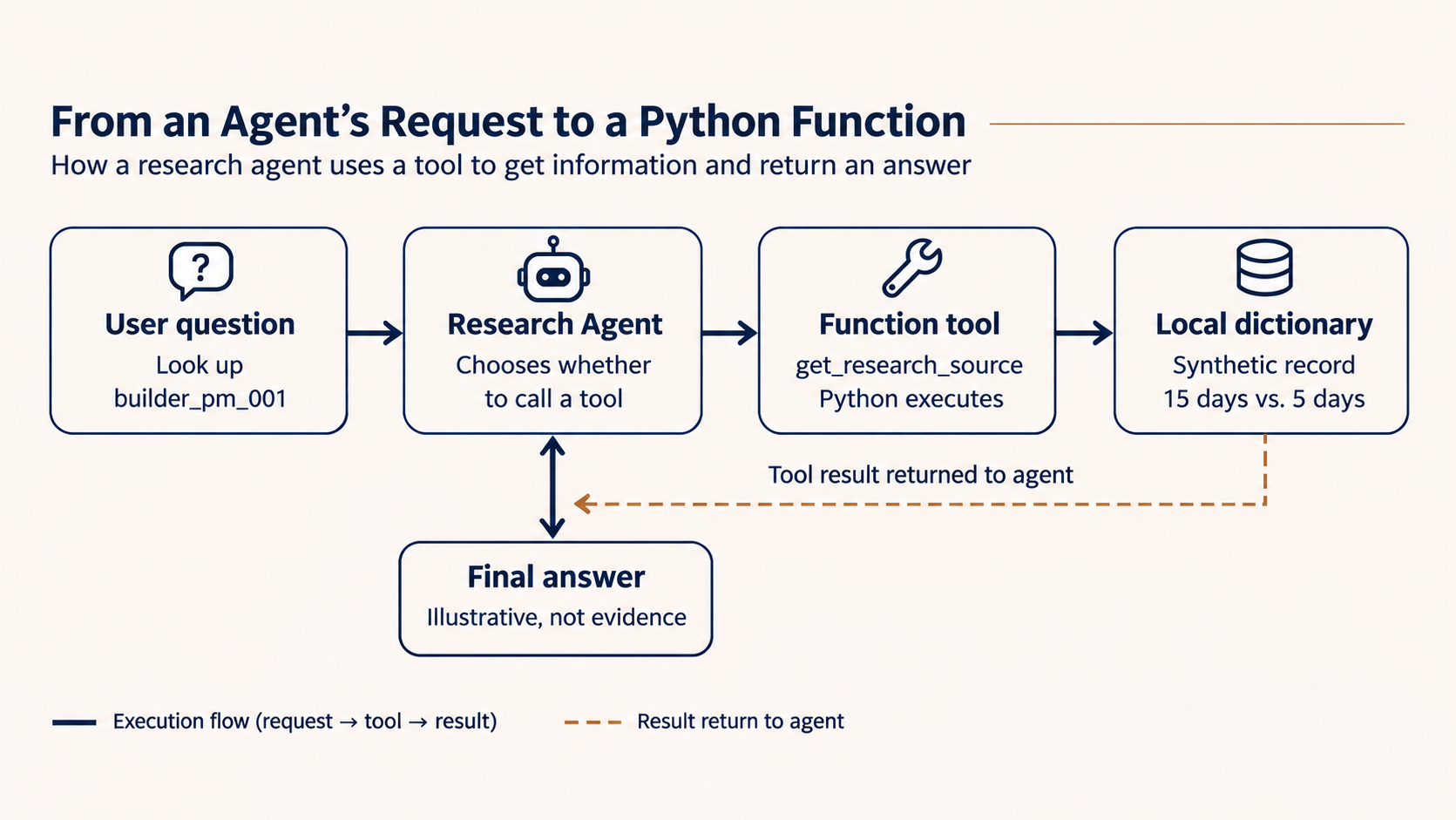
- Your question asks about source
builder_pm_001. - The agent recognizes that
get_research_sourcecan retrieve the record. - The agent requests the function with
source_id="builder_pm_001". - Python reads the local dictionary and returns a structured record.
- The agent interprets the result and responds.
Lab 2.1: Research a fictional source
File: lab-02/lab2_agent.py.
Extract the ZIP and open the lab-02 folder. This lesson uses lab2_agent.py; the package also
contains the web search exercise for Lesson 2.4.
The dictionary contains this deliberately fictional comparison:
| Approach | Illustrative duration |
|---|---|
| Traditional product development | 15 days |
| Product Builder approach | 5 days |
The example makes the behavior of the function easy to inspect. It does not demonstrate a real improvement in delivery time.
Run it
Open a terminal in the extracted lab-02 folder. Create and activate a virtual environment, install the requirements, and set OPENAI_API_KEY, as described in the README. Then run:
python lab2_agent.pyYou’ll see the agent’s answer, followed by one line per execution item. A ToolCallItem line shows the tool the agent requested and the arguments it supplied; a ToolCallOutputItem line shows the beginning of what the function returned.
What to inspect
Look for these items:
| Execution item | Meaning |
|---|---|
ToolCallItem |
The agent requested the function. |
ToolCallOutputItem |
The function produced a result. |
MessageOutputItem |
The agent produced a response. |
In our run, the agent retrieved the record, calculated (15 - 5) / 15 × 100 ≈ 66.7%, and identified the input as fictional. The agent may report the results differently.
Experiment: Change the source ID
In lab2_agent.py, change builder_pm_001 in the prompt to a nonexistent ID, such as missing_001, and run it again.
The tool should return a not-found response. Observe whether the agent acknowledges the missing record rather than inventing one.
Then restore the original ID and try changing the numbers in the dictionary. Predict the new percentage before running the agent.
What matters
Tool registration isn’t proof of external knowledge. The function can only return the records the application provides. In this lab, those records are fictional. The agent can perform correct calculations on synthetic values, but it must not present the result as measured evidence.
This also illustrates the difference between tools and instructions: an instruction may ask the agent to be careful, while the tool implementation determines what data is actually returned.
Check your understanding
- What does
@function_toolchange about an ordinary Python function? - Who chooses to call
get_research_source, and who executes it? - What should the agent say if the source ID doesn’t exist?
- Why can’t the 66.7% figure support our Product Builder hypothesis?
Answers
- It registers the function as an agent-accessible tool with an input contract.
- The model requests the call; the SDK/runtime executes the Python function.
- That the source was not found, without fabricating contents.
- The durations were created for teaching, not collected from a real study.