What Actually Happened?
In Lesson 9.3, we attempted to approve a publication request with an unauthorized reviewer ID, then approved it with research_lead.
The terminal showed the final status, but that status alone doesn’t tell us everything that happened along the way. How can we establish which requests were permitted, who attempted to authorize them, and what actually ran?
That is the purpose of an audit trail.
The Gateway’s Audit Trail
In Lab 9, the Governance Gateway writes the governance audit trail. It records policy decisions before actions run, execution outcomes afterward, and human review attempts. If a required decision cannot be recorded, the Gateway does not execute the action.
Each session has an audit file:
lab9/data/sessions/<session_id>/audit.jsonl
JSONL means JSON Lines: one JSON record per line, written in sequence. Lab 9 uses three event types:
| Event | What it records |
|---|---|
decision |
Whether a request is allowed, denied, or requires approval |
review |
Whether a human approval or rejection attempt was accepted |
outcome |
What happened when an authorized tool ran |
A decision tells us what was permitted. An outcome tells us what ran. Read both before drawing conclusions.
Reading the Audit Trail
Here are the fields most useful for interpreting Lab 9’s records.
| What the record says | What it means | What it does not mean |
|---|---|---|
policy_decision: ALLOW |
The request passed the Gateway’s policy checks | The tool succeeded |
policy_decision: DENY, execution_status: DENIED |
The Gateway denied the request; nothing ran | The agent necessarily did something malicious |
policy_decision: REQUIRE_APPROVAL, execution_status: PENDING_APPROVAL |
The action is waiting for authorized human approval | Approval has been granted |
event: review, accepted: false |
A review attempt was refused | The request was rejected; it can remain pending |
event: review, accepted: true |
The reviewer’s decision was accepted | Publication has completed |
event: outcome, execution_status: EXECUTED |
The tool call completed | Its result was useful or met the research objective |
execution_status: FAILED |
An authorized tool attempt raised an execution error | The request failed a permission check |
A subtle example: if a permitted website responds with HTTP 403, the retrieval tool still ran. The audit can record EXECUTED while the result reports retrieval_status: blocked, because the website refused access. This is different from DENIED, where the Gateway refused the request and nothing ran.
Similarly, a refusal from reviewer 1 is a review event with accepted: false. It is not the same as an authorized reviewer choosing REJECT, which changes the publication request to REJECTED.
Reconstructing a Publication Request
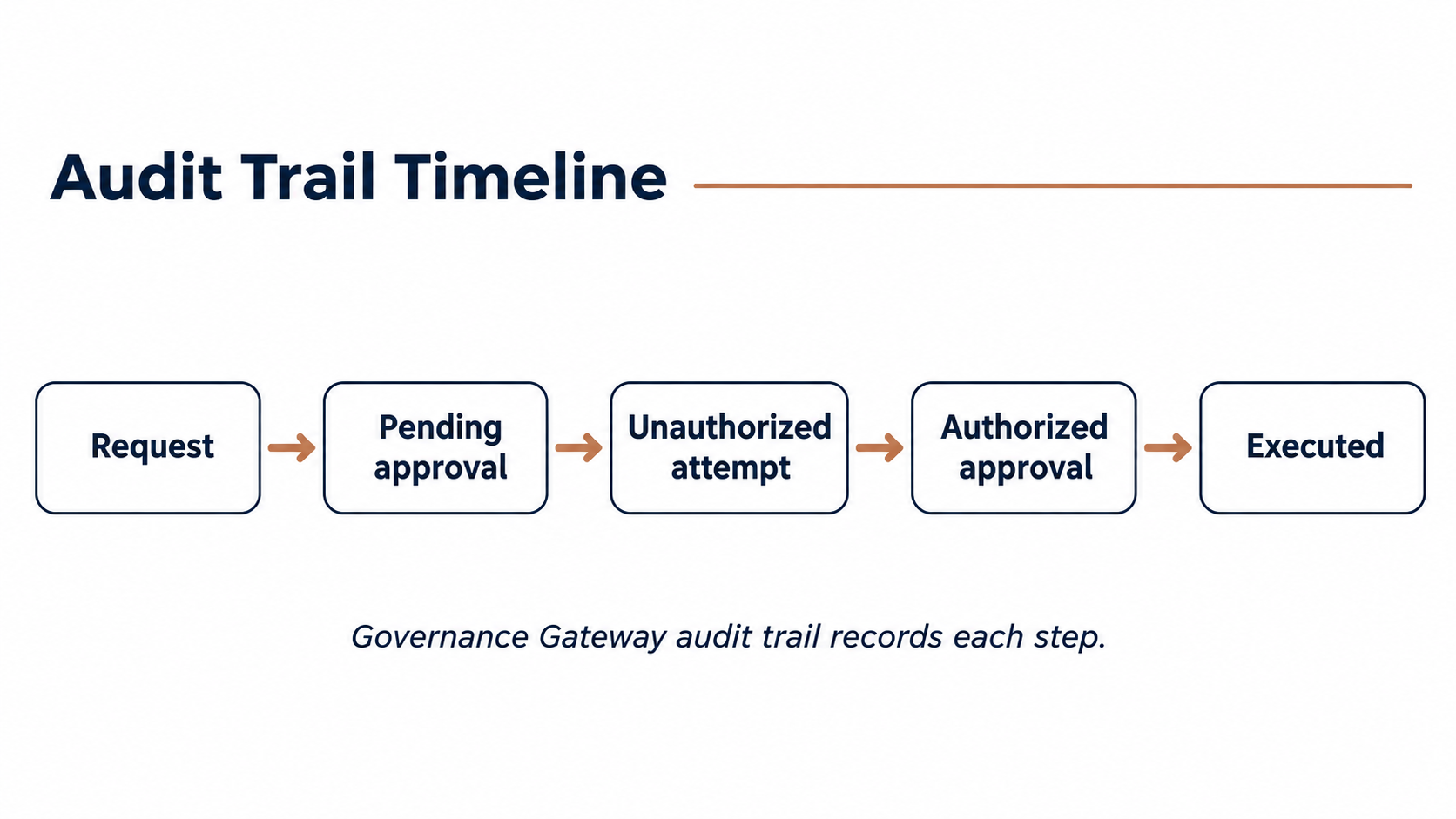
In our offline example, the important sequence is:
| Audit evidence | Plain-language interpretation |
|---|---|
decision with REQUIRE_APPROVAL and PENDING_APPROVAL |
The Gateway accepted the request for review, but nothing was published |
review with reviewer: "1" and accepted: false |
An unauthorized reviewer attempted approval; the request stayed pending |
review with reviewer: "research_lead" and accepted: true |
An authorized reviewer’s approval was accepted |
decision with execution_status: EXECUTING |
The Gateway rechecked authorization and was about to run the action |
outcome with execution_status: EXECUTED |
The publication tool completed; inspect its result for the destination |
For example, this is a shortened real review event from an offline Lab 9 session, with the fingerprint abbreviated:
{
  "event": "review",
  "decision": "APPROVE",
  "reviewer": "1",
  "accepted": false,
  "reason": "Reviewer not authorized",
  "session_id": "research_offline-20261102T063400Z",
  "request_fingerprint": "19ce3a1784dee10f…"
}
The session_id connects events from one run. Within that session, the request_id and request_fingerprint help connect records about the same action. The short ID shown in the terminal is derived from the fingerprint; the full request_id is a separate identifier.
Three Records, Three Questions
The agent’s recommendation, the current publication status, and the audit trail answer different questions.
| Question | Where to look |
|---|---|
| What did the agent recommend? | review_output.json → decision.decision and rationale |
| What is the request’s current status? | review_output.json → publication_request.execution_status |
| What happened, and in what order? | audit.jsonl → Gateway events |
The agent’s recommendation remains unchanged. For example, proposed_for_publication can remain the recorded recommendation after the request reaches EXECUTED or REJECTED.
The status in review_output.json is a convenient summary refreshed from the audit log. The audit trail is the authoritative governance record in Lab 9. In Offline Mode, the recommendation comes from a prepared fixture, not a live model run.
Recovery Without Repeating Work
An interruption should not automatically restart an entire workflow.
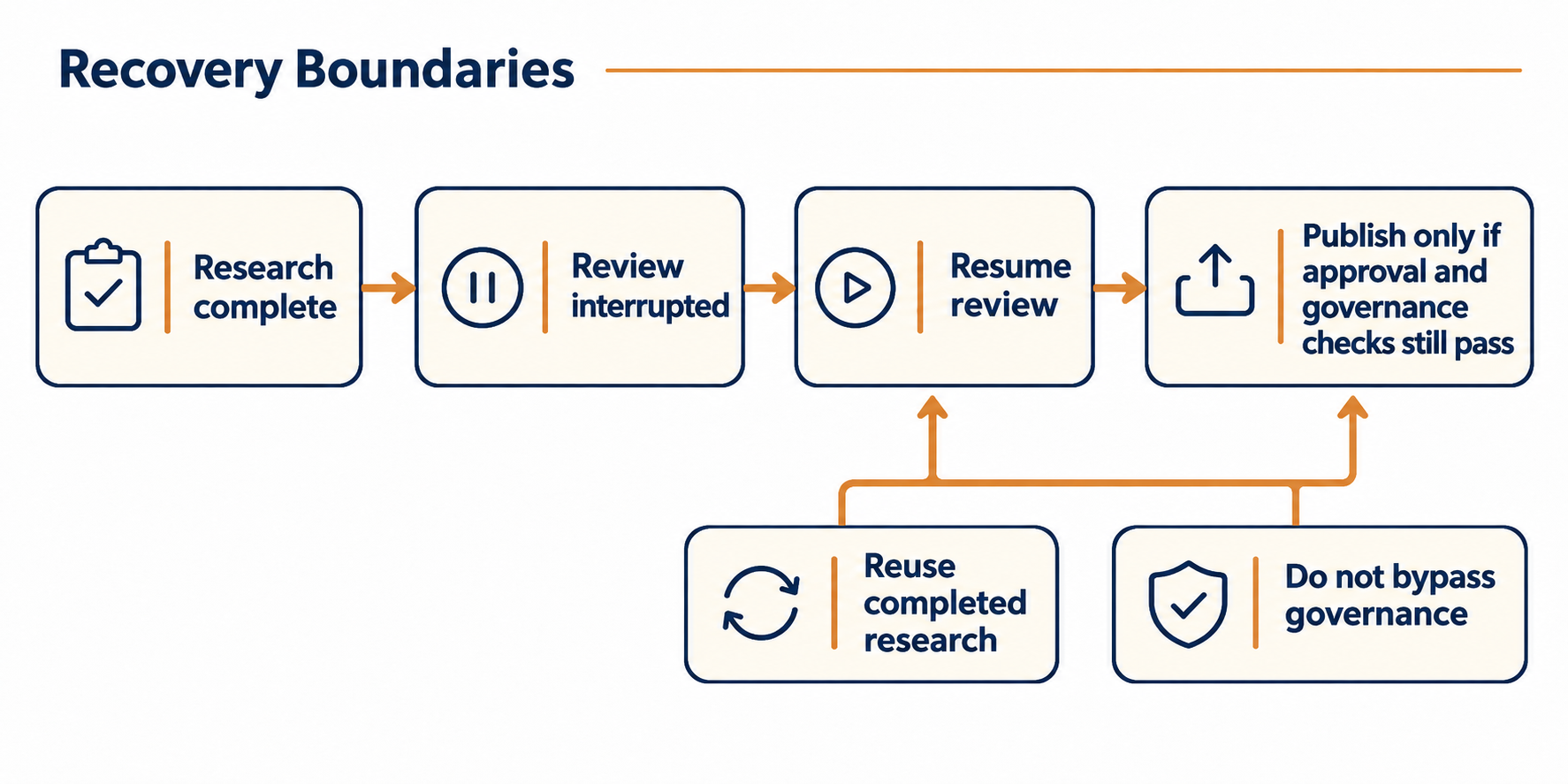
Lab 9 provides two distinct recovery paths for live research sessions:
python -m lab9.research_run resume-review <session_id>resumes an unfinished publication review using saved research. It does not repeat searches, but it still requires consent and can incur model costs.python -m lab9.research_run submit-decision <session_id>submits an already-recorded review decision without another model call; it does not submit the same governed request twice.
These are not part of the offline exercise below.
For publication itself, approvals are single-use and tied to the request and content. If the content changes, the earlier approval cannot authorize it. After a publication completes, running the review command again reports that no requests are pending; the report is not republished.
If execution fails, the Gateway records FAILED. Lab 9 does not automatically retry failed publication, and an approval is consumed by the attempt. Recovery must preserve the original authorization boundary.
Can We Trust the Record?
The local audit file makes decisions inspectable, but it is not tamper-evident. A production system would need stronger access controls, durable storage, and safeguards against unauthorized modification.
Auditing also does not prove that research conclusions are correct. It shows how the application handled actions.
Beyond the Audit Trail
Execution tracing provides a broader view of model calls, tool use, and work passed between agents. Governance auditing focuses on permission, authorization, and execution. Both can support investigation and improvement, but they answer different questions.
They are also separate records. Lab 9’s governance audit log excludes the full text of retrieved evidence. In Live Mode, however, the OpenAI Agents SDK keeps its own traces, which are enabled by default and may capture and export tool inputs, tool outputs such as retrieved page text, and other execution details to OpenAI.
We intentionally leave the SDK’s default tracing unchanged: Hello Agent focuses on understanding governance boundaries, not on implementing a production telemetry policy. Applications that handle sensitive information must separately configure and review tracing, access, and retention.
Further reading: OpenTelemetry Generative AI semantic conventions and OpenAI Agents SDK tracing. A future course appendix will explore agent quality, observability, and continuous improvement in more depth.
Lab 9.4: Interpret an Audit Trail
Use the session you created in Lesson 9.3. You do not need to repeat the approval sequence or make paid model calls.
In the extracted lab-09 folder, locate your session ID in the terminal output from Lesson 9.3. It is also the folder name under lab9/data/sessions/.
To summarize the audit events in your terminal, replace <session_id> with that folder name and run:
python -c "import json,sys; [print(e['event'], e.get('tool') or '-', e.get('policy_decision') or '-', e.get('execution_status') or '-', e.get('reviewer') or '-', e.get('accepted', '')) for e in map(json.loads, open(sys.argv[1]))]" lab9/data/sessions/<session_id>/audit.jsonlFocus on the final publish_report events, rather than reading every research tool call.
Find evidence of three stages:
- The Gateway required approval and kept the publication request pending.
- The attempt by reviewer
1was refused. - The authorized approval by
research_leadwas followed by an execution outcome.
For each stage, ask: What happened? Which field proves it? What can I not conclude from this record alone?
If you no longer have a session from Lesson 9.3, create a new one with python -m lab9.run (option 1), then follow the Lesson 9.3 approval exercise. A new offline run requires no paid model calls.
What We Learned
An audit trail is not just a log of final statuses. It lets us reconstruct the decisions, review attempts, and execution outcomes behind an action.
In Lab 9, the Governance Gateway owns the audit trail. The agent recommendation remains a separate record, and recovery cannot bypass the permission and approval rules already in place.
In Lesson 9.5, we’ll bring these controls together and consider how teams maintain agent quality after deployment.
Test Your Understanding
Question 1 of 3
A Gateway decision event contains policy_decision: ALLOW. What can you conclude?